Shopify Payments payouts
With Shopify Payments, Shopify collects your customers' card payments and sends the money to your bank in payouts: the payments of a few days, minus refunds and fees. The connector turns every payout into one journal entry, so the payment of each order is cleared, the fees are booked, and the bank line matches one amount.
- Your shop uses Shopify Payments. Other gateways (PayPal, manual) have no payouts in Shopify; development stores have none either.
- The app has the scopes
read_shopify_payments_payoutsandread_shopify_payments_accounts. - Orders paid with Shopify Payments are imported with payment method
shopify_payments, and that payment method has Register Payment When Paid on with a Payment Journal (for example a Shopify Payments bank journal). The payment then waits on the journal's outstanding receipts account until the payout.
Set up
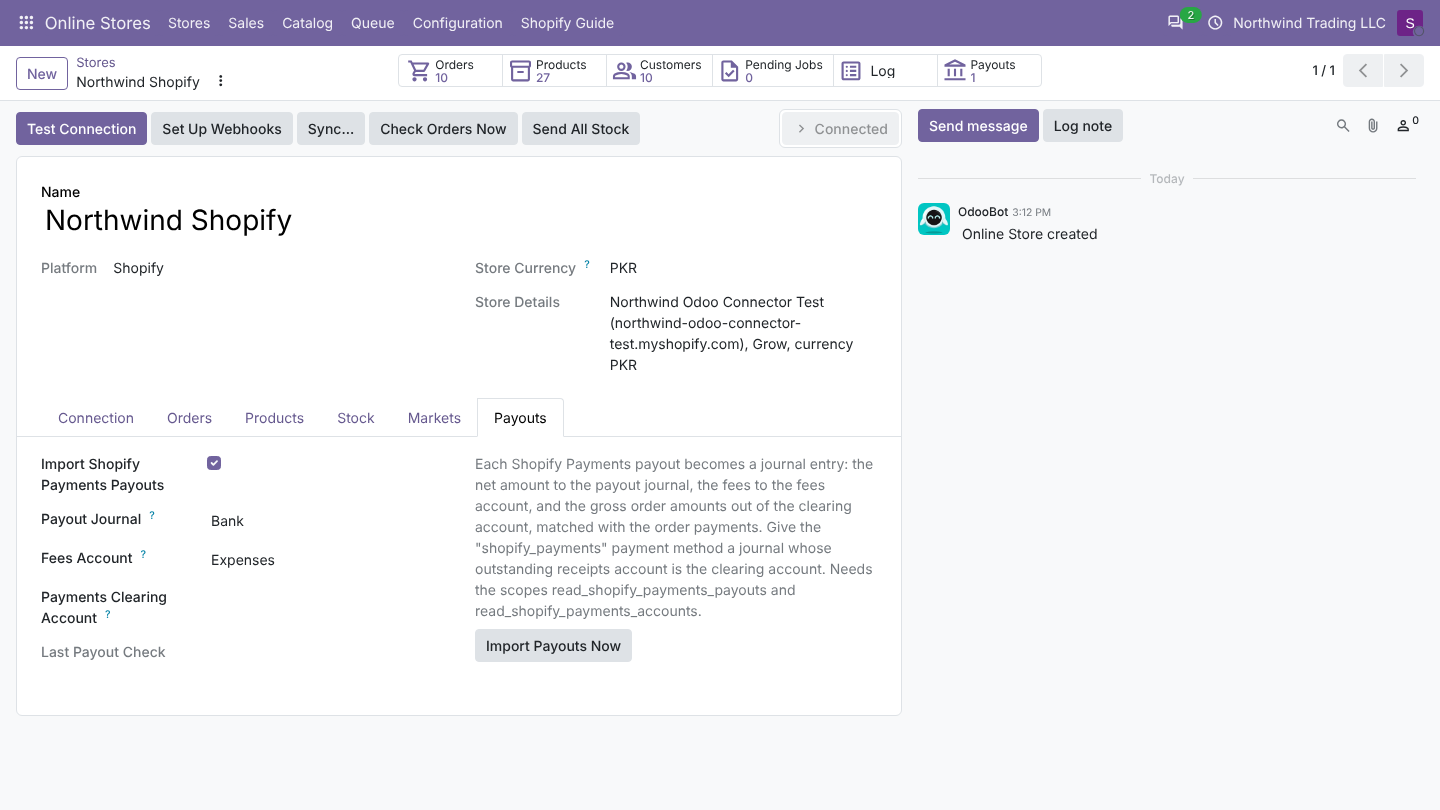
- Open the store, tab Payouts.
- Turn on Import Shopify Payments Payouts.
- Choose the Payout Journal: the bank journal of the account the payouts reach (or a miscellaneous journal).
- Choose the Fees Account: an expense account, for example Bank and payment fees.
- Leave Payments Clearing Account empty, unless your order payments wait on one fixed account; see below.
- Click Import Payouts Now, or wait for the daily import.
Method 1: automatic
The scheduled action Shopify: import payouts runs once a day for every connected store with payouts on.
Method 2: by hand
Import Payouts Now on the Payouts tab queues the import at once.
Which payouts are imported
- Payouts with status paid only. Scheduled and in-transit payouts are imported on a later run, once paid.
- Issued on or after Last Payout Check. The first time: from seven days before Import Orders From. After each run Last Payout Check is set to two days ago, so a payout that becomes paid late is still found.
- Each payout once.
For each payout Odoo also reads its balance transactions: charges, refunds, adjustments and their fees. The transfer of the payout itself is not a line.
The journal entry
| Line | Account | Debit | Credit |
|---|---|---|---|
| The payout | Payout journal: its suspense account (bank journal) or default account (miscellaneous journal) | Net payout | |
| Fees | Fees Account | Total fees | |
| Each charge of an order | The account of that order's payment (see below) | Gross charge | |
| Each refund of an order | The account of that order's refund payment | Refund | |
| Adjustments without order | The clearing account | as Shopify reports | as Shopify reports |
Example: two orders of 4,019.72 and 2,485.94, one refund of 790.94, fees 120.00:
| Line | Debit | Credit |
|---|---|---|
| Payout 31 | 5,594.72 | |
| Payout 31 fees | 120.00 | |
| charge #1001 | 4,019.72 | |
| charge #1002 | 2,485.94 | |
| refund #1002 | 790.94 |
The entry is posted, and the payout's bank line (the net amount) can be matched with the payout line in the bank reconciliation.
Matching with the order payments
For each charge or refund with an order, Odoo looks for the open journal items of that order's payments (outside receivables), uses their account for the line, and reconciles them together after posting. The Reconciled box shows on each transaction of the payout.
- Payments Clearing Account empty (recommended): the account of the order's own payment is used, whatever journal it is in.
- Payments Clearing Account set: only payment items on that account are matched; lines without match go to that account.
- No payment found (order not paid in Odoo, or not imported): the line goes to the clearing account (the outstanding account of the
shopify_paymentspayment method's journal, else of the store's default payment journal) and stays open for you to match.
Odoo and Shopify can round an order's tax differently by one cent. When the order payment in Odoo is up to 5 cents away from Shopify's charge, Odoo credits exactly the payment amount, so the payment is fully matched, and puts the difference on the fees line.
Payouts list
Online Stores > Sales > Shopify Payouts (shown to users with invoicing rights), or the Payouts button on the store.
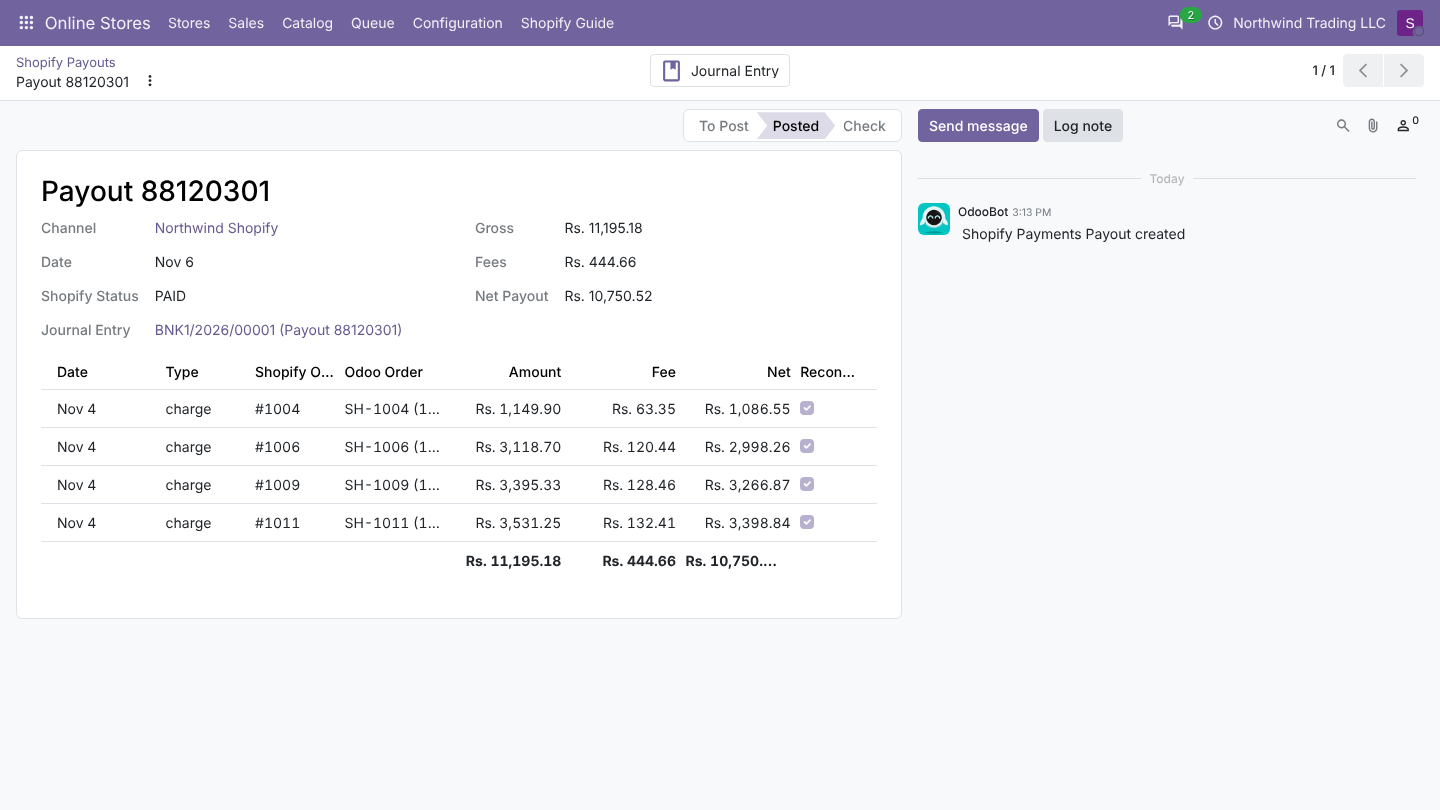
| Field | Meaning |
|---|---|
| Date | Payout issue date |
| Gross, Fees, Net Payout | Sum of the transactions, sum of their fees, amount sent to the bank |
| Journal Entry | The posted entry |
| Status | To Post, Posted or Check |
| Transactions | Type, Shopify Order, Odoo Order, Amount, Fee, Net, Reconciled |
When a payout shows Check
A payout is set to Check and not posted when:
- Its transactions minus fees do not add up to the payout amount (Transactions (... - fees ...) do not match the payout ...). Shopify sometimes holds reserves; check the payout in Shopify.
- The fees account is missing, or no clearing account can be found. The reason is shown on the payout.
Without a Payout Journal, payouts are imported but stay To Post.
Fix the cause, then open the payout and click Create Journal Entry.
Good to know
- Payouts are in the payout currency; with another company currency the entry is converted at the payout date rate.
- Disputes and chargebacks appear as adjustment transactions; check them in Shopify.
- Deleting the journal entry does not re-import the payout: click Create Journal Entry on it.