
Odoo Shopify Connector
Run your Shopify store from Odoo. New orders arrive in Odoo within seconds, with the right customer, taxes, discount codes and shipping. Odoo confirms, invoices and registers the payment, sends stock to each Shopify location and prices to your Markets, and fulfills the Shopify order with the tracking number when you deliver. Cancellations and refunds follow in both directions, and Shopify Payments payouts become journal entries matched with the order payments.
Odoo 17.0 - 20.0 Community & Enterprise $399 one-time ($350 + $49 engine)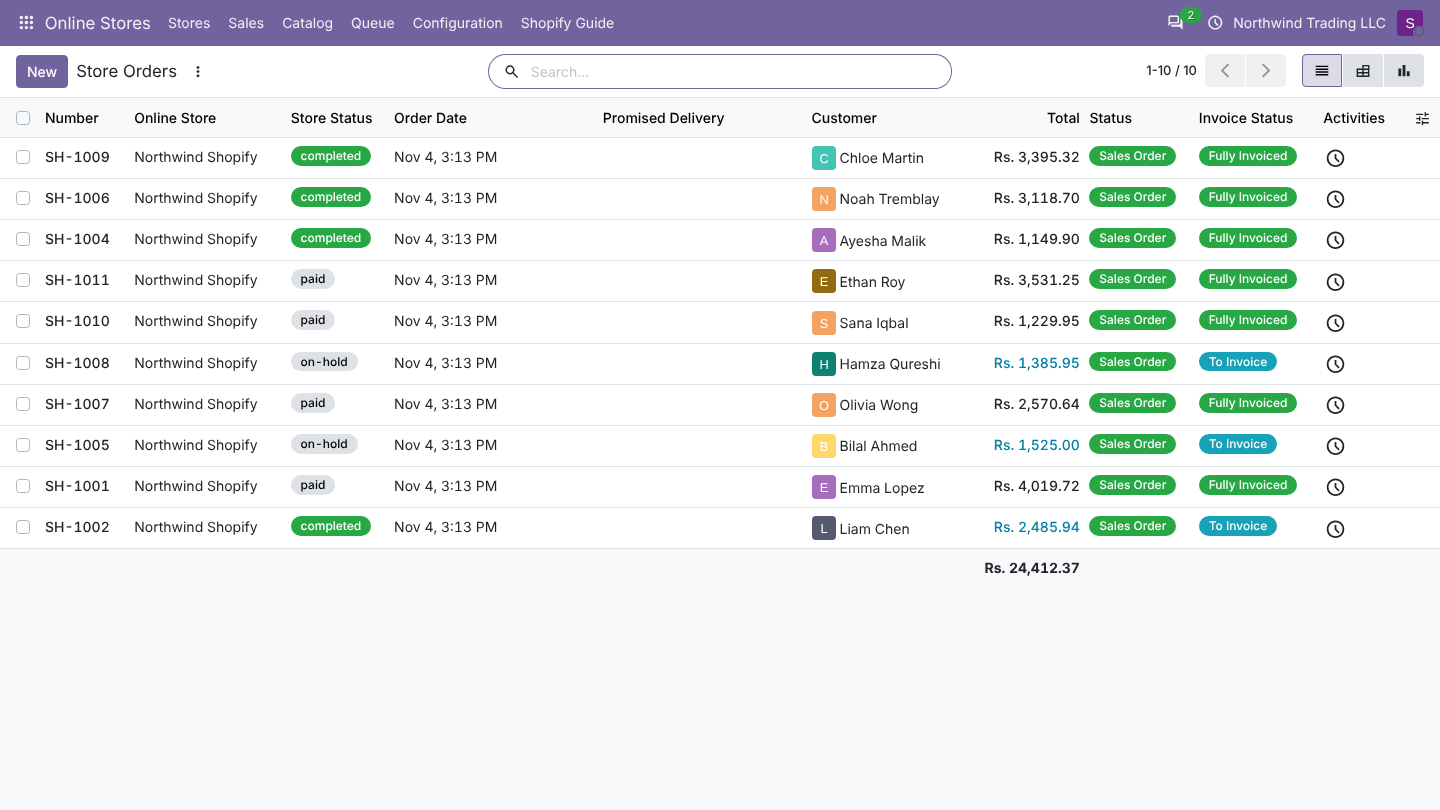
Odoo Shopify Connector on the Apps Store
Supported features
| Area | What you get |
|---|---|
| Connection | Shopify GraphQL Admin API (version 2026-10 by default). Three ways to connect: an app in your own Shopify organization (client ID and secret, Odoo renews the token itself), an install link for agency apps, or the access token of an existing custom app. Several stores, in one or several companies. |
| Orders | Import by webhook within seconds, plus a check every 15 minutes. Customer, invoice and delivery address, product lines, discount codes, shipping, taxes, note, payment gateway. Totals are compared with Shopify. Cash on delivery and other unpaid orders can be confirmed at once or kept as quotations. |
| Order workflow | Per payment gateway: confirm, validate the delivery, create and post the invoice, register the payment in a journal. |
| Order changes | Later changes in Shopify (payment, address, added lines before delivery, cancellation, refunds) update the Odoo order. |
| Fulfillment | Validating a delivery in Odoo fulfills the Shopify order, also partially, with carrier and tracking number. |
| Cancellations | Both ways. Odoo can restock and refund the payment when it cancels in Shopify. |
| Refunds | Shopify refunds become credit notes. Credit notes from Odoo become Shopify refunds, with or without moving the money. |
| Customers | Matched by Shopify customer, then by email; companies, invoice and delivery addresses kept apart. Bulk import of all customers. |
| Products | Import from Shopify (options become attributes, collections become store categories, SKUs, barcodes, weights, images). Send products from Odoo (create or update, draft or active, images uploaded by Odoo). |
| Stock | Odoo is the master. Each Shopify location gets the stock of the Odoo warehouses you choose. Free, on hand or forecasted quantity, with a buffer. Sent when stock moves and every hour. |
| Prices | Price and compare-at price from Odoo pricelists. Fixed prices for each Shopify Market from a pricelist in the market currency. |
| Payouts | Shopify Payments payouts as journal entries: net amount, fees, and each order payment matched. |
| Operations | Job queue with automatic retries, a readable log, a dashboard per store, protection of test copies of the database, two access levels. |
What is sent where
| From | To | What |
|---|---|---|
| Shopify | Odoo | Orders and their changes, customers, refunds, cancellations, products, variants, collections, images, stock (once, when you start), payouts |
| Odoo | Shopify | Stock per location, prices and compare-at prices, Market prices, fulfillments with tracking, cancellations, refunds, products you choose to send |
Data only travels between your Odoo and your Shopify store. Nothing goes through Novator.
How it works
- Webhooks: Shopify calls Odoo when an order is created or changed. Each call is checked (signature and shop) and turned into a job.
- Safety net: every 15 minutes Odoo asks Shopify for orders changed since the last check, so orders placed while Odoo was offline still arrive.
- Job queue: every import and every update to Shopify is a job in Online Stores > Queue > Jobs. A job that fails is tried again after 2, 4, 8 and 16 minutes, then waits for you with the reason.
- Workflows: after an order is imported, the settings of its payment method decide what Odoo does next.
Included in version 1.0
| Included | Not included yet |
|---|---|
| GraphQL Admin API (2026-10), Dev Dashboard apps, install link, existing custom app tokens | Shopify App Store listing (the app is your own) |
| Orders by webhook and every 15 minutes, with later payment, cancellation, refund and address changes | Order edits that remove items or lower quantities, duties, tips |
| Cash on delivery and other unpaid orders, confirmed or kept as quotations | Draft orders and abandoned checkouts |
| Customers with companies, invoice and delivery addresses | Customer tags, marketing consent, customer metafields |
| Products and variants both ways, images, SKU matching | Collections, tags, vendor, SEO and metafields sent from Odoo; more than 100 variants per product |
| Stock per Shopify location from chosen warehouses | Stock of kits (bills of materials) computed from components |
| Prices with compare-at, fixed prices per Shopify Market | B2B catalogs, quantity rules, volume pricing |
| Fulfillments with tracking, also partial | Reading Shopify returns |
| Refunds both ways, cancellations both ways | Gift card balances |
| Shopify Payments payouts with fees, matched with order payments | Payouts of other gateways (PayPal and others have none in Shopify) |
| Job queue, log, dashboard, protection of test copies, two access levels |
Next steps
- Install the app. It installs the Commerce Bridge engine with it.
- Create the Shopify app and connect the store.
- Go through the store settings, locations and payment methods.
- Import your products and set up webhooks.
- Read how orders are imported and what each Shopify status does.
- Optional: Markets and Shopify Payments payouts.
Every purchase includes a free setup call: write to [email protected].
Was this page helpful?