Shopify Markets prices
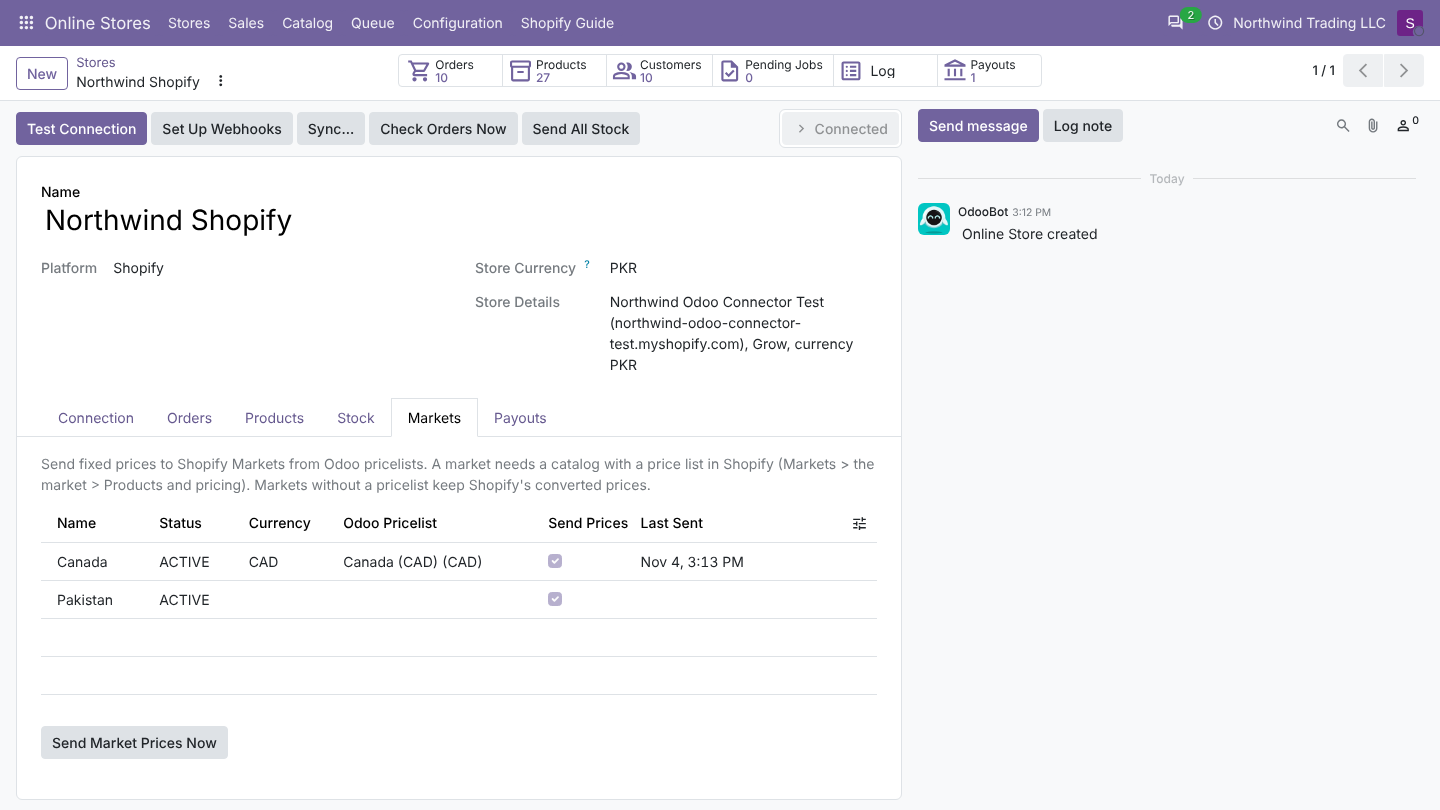
Shopify Markets sell in other countries and currencies. By default Shopify converts your shop prices. With the connector you can instead send fixed prices from an Odoo pricelist, for example a CAD pricelist for Canada.
Before you start
- In Shopify, the market needs a catalog with a price list (Shopify admin: Markets, open the market, Products and pricing). Markets without one show an empty Shopify Price List in Odoo and cannot get fixed prices.
- Create an Odoo pricelist in the market's currency (activate the currency in Odoo first).
- The app needs the scopes
read_marketsandwrite_markets.
Steps
- Open the store, tab Markets. The list is read on Test Connection; click Read Locations and Markets Again on the Stock tab after you change markets in Shopify.
- On the market line, choose the Odoo Pricelist. Odoo refuses a pricelist in another currency: Market Canada uses CAD: choose a pricelist in CAD.
- Optional: choose a Compare-at Pricelist. When it gives a higher price, Shopify shows it crossed out.
- Keep Send Prices on.
- Click Send Market Prices Now to send all linked variants at once.
The Markets list
| Column | What it means |
|---|---|
| Name, Status | Read from Shopify. |
| Currency | Currency of the market's price list. |
| Shopify Price List | ID of the price list. Empty: no catalog with a price list, the line is read only. |
| Odoo Pricelist | Source of the fixed prices. |
| Compare-at Pricelist | Optional source of compare-at prices. |
| Send Prices | Off: this market is skipped. |
| Last Sent | When prices were last sent. |
When prices are sent
| When | Variants sent |
|---|---|
| Send Market Prices Now | Every linked variant with Send Price on |
| After shop prices are sent (hourly with Send Prices Automatically, Send prices to the store, Send Price to Store) | The same variants as the shop prices |
| After a product is sent from Odoo | The variants of that product |
Each price is the pricelist price for one unit, rounded to two decimals, in the market currency. Up to 250 prices go in one call. Errors are logged per market (Market Canada: ...).
Good to know
- Fixed prices replace Shopify's converted price for that variant in that market. Variants you never send keep the converted price.
- Removing the pricelist from a market stops updates but does not remove the fixed prices already in Shopify; remove them in Shopify if needed.
- Orders are imported in the shop currency (Shopify's shop amounts), whatever the customer's currency.
FAQ
The Pakistan market has no price list. It has no catalog in Shopify. Add one in Shopify, then read the markets again.
Can a market get its own sale prices? Yes: use a lower Odoo Pricelist and a Compare-at Pricelist with the regular prices.
Was this page helpful?