How products are matched
Every order line and every imported product has to land on one Odoo product variant. This page gives the rules.
What Shopify sends on an order line
| Shopify | Used as |
|---|---|
| Variant ID | First lookup: the product link of that variant. |
| Product ID | Second lookup: the link of a simple product (simple products are linked by their product ID). |
| SKU of the line | Third lookup: Odoo Internal Reference, then Barcode (with Match Products By Internal Reference, then Barcode = SKU). |
A line whose product was deleted in Shopify has no variant and no product ID; only its SKU can match it.
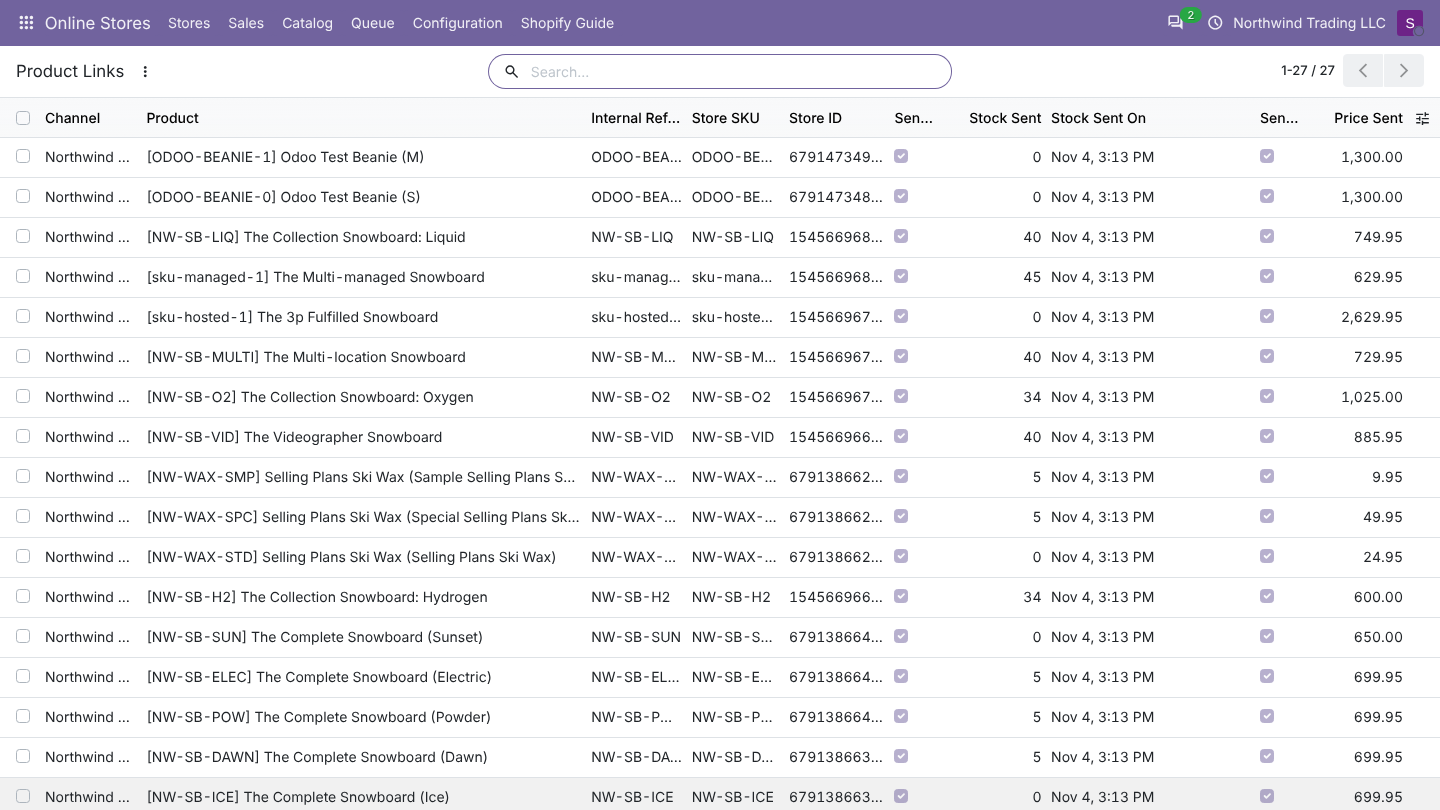
Odoo keeps a link between each Shopify product and an Odoo product: Online Stores > Catalog > Store Products for products, Product Links for each variant. Links are how orders, stock and prices find the right product.
How an order line finds its product
- Link. Odoo looks for a product link with the variant ID of the line, then with the product ID.
- SKU. Odoo looks for a product whose Internal Reference equals the SKU of the line. With Match Products By set to Internal Reference, then Barcode = SKU, it also tries the Barcode. Only products of the store's company or of no company count; archived products count too.
- Import. With Import Unknown Products With Orders on, Odoo imports the product from Shopify (step by step as below), then tries the link again.
- Not found. The whole order waits in the queue with Products not found in Odoo: ... Link or import them, then retry. Nothing is created for that order until every line has a product.
A line found by SKU does not create a link. Run Sync... > Import products from the store once so every product is linked; stock and prices are only sent for linked products.
How a product import finds or creates the Odoo product
- Link. A Shopify product that is already linked keeps its Odoo product.
- SKU. Odoo looks for an Odoo product with the SKU of the product, or of any of its variants (same rules as above), and links its product template.
- Create. When nothing matches, Odoo creates the product.
When Odoo links an existing product, it does not change it: name, description, prices and taxes stay as they are in Odoo. Only a missing image is added (with Import Images on).
What a new product looks like
| Odoo field | Value |
|---|---|
| Name | The Shopify product name |
| Product type | Storable (tracked in inventory) |
| Sales Price | The store price (for variants: the lowest variant price) |
| Internal Reference, Barcode | The SKU and barcode. A barcode already used by another product is left empty. |
| Weight | The store weight |
| Sales description | The short description from the store, when there is one |
| Product Category | The Odoo category mapped to its store category (Catalog > Store Categories), else Category for New Products |
| Company | None (the product is shared by all companies) |
| Image | The main store image, with Import Images on |
Variants
- Each option of the store product (for example Size, Color) becomes an Odoo attribute with the same name, set to create variants. An existing attribute of that name is reused only if it also creates variants instantly; Odoo never touches an attribute set to Dynamically or Never.
- Each Shopify variant is linked to the Odoo variant with the same SKU, else with the same option values.
- New variants get the SKU, barcode, weight and image of the store variant.
- Prices: the lowest variant price becomes the product's Sales Price. When variants have different prices and the store has a Pricelist, Odoo adds a fixed price per variant to that pricelist. Without a store pricelist, only the lowest price is kept.
- Store variants that match no Odoo variant are listed in the log as a warning. Their orders then need the product linked by hand or a matching SKU.
Examples
| Situation | Result |
|---|---|
| The Odoo product has the same SKU | Linked. Nothing in the Odoo product changes. |
| No SKU in the store, product not in Odoo | Created with the store name and price. |
| Two store products use the same SKU | The second import stops with Odoo product X is already linked to another store product (SKU clash with store product Y). Give each store product its own SKU. |
| Store product type not supported by the connector (for example a bundle or external product) | Skipped with a warning in the log. |
| A product is renamed in Shopify after linking | The Odoo name stays. Odoo is the master of product data once linked. |
FAQ
I imported products by mistake. How do I undo it? Archive or delete the created Odoo products, then delete their lines in Store Products. Nothing changes in Shopify.
Can one Odoo product be linked to two stores? Yes, one link per store. Within one store, a product can only be linked to one store product.
Can I link a product by hand? Give the Odoo product the store SKU as Internal Reference, then run Sync... > Import products from the store again.
Shopify specifics
- Many Shopify shops have variants without SKU. They are still matched on import by their option values (Size M, Color Blue) and linked by ID, so later orders find them without SKU.
- Odoo remembers each variant's Shopify variant ID and inventory item ID on the product link. The inventory item ID is what stock updates need; it is filled again automatically if it is missing.