What an order contains
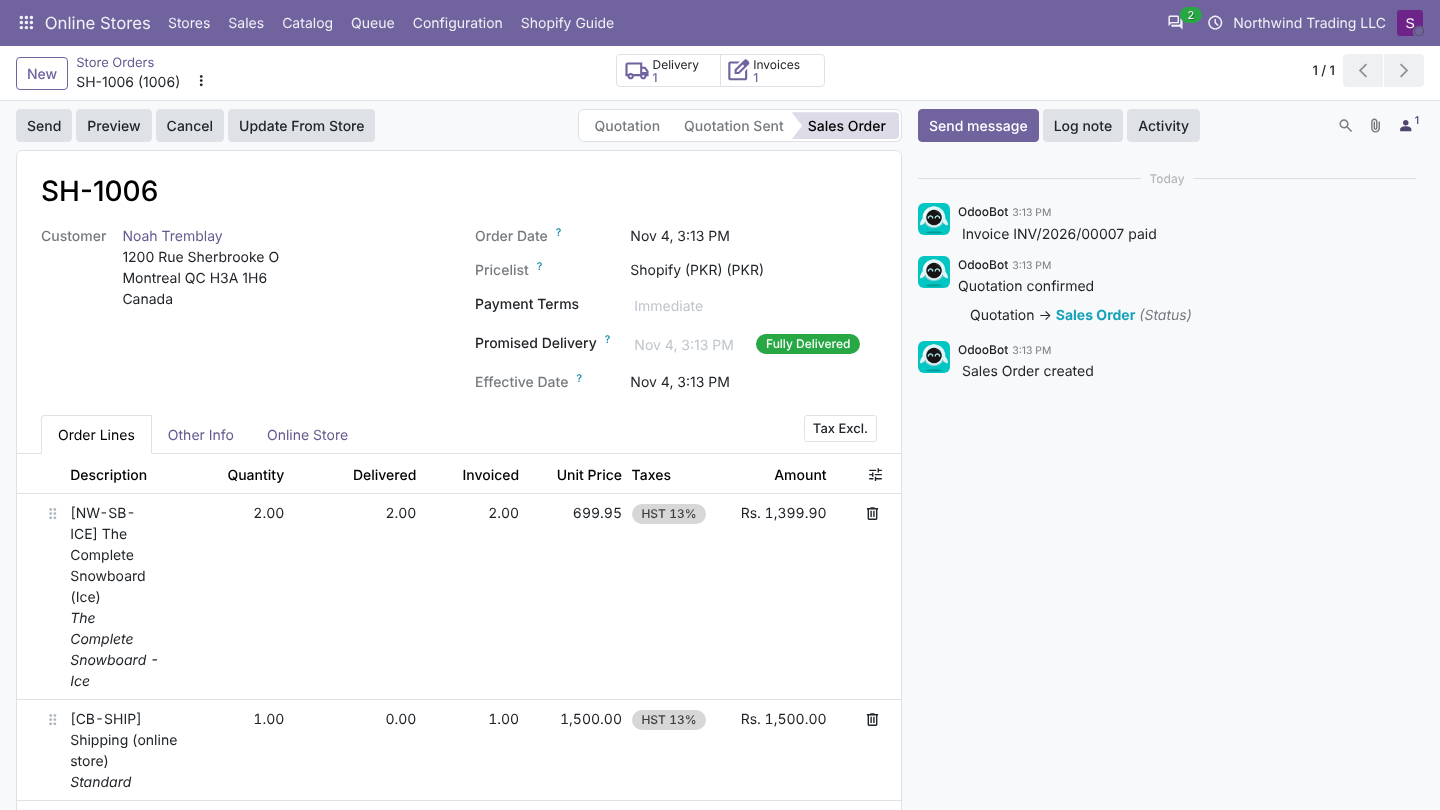
Header
| Odoo | From Shopify |
|---|---|
| Order Reference | Order Prefix + order number without # (SH-1001) |
| Customer, Invoice Address, Delivery Address | Customer, billing and shipping address (How customers are matched) |
| Order Date | Processed date (else created date), in UTC |
| Customer Reference | Order number |
| Pricelist | The store Pricelist, or a pricelist in the order currency |
| Warehouse | The store's Order Warehouse |
| Sales Team, Salesperson, Payment Terms, Fiscal Position | From the store (payment terms of the payment method win) |
| Online Store tab | Store Order Number, Store Status, Store Payment Method, Paid in the Store, Coupons (discount codes), Customer Note, Shopify total |
The order note from Shopify is also posted in the chatter (Customer note: ...).
Product lines
One line per Shopify line item:
| Odoo line | From Shopify |
|---|---|
| Product | The linked variant (How products are matched) |
| Description | Line name (product and variant title) |
| Quantity | Ordered quantity |
| Unit Price | Original line total divided by the quantity (before discounts) |
| Taxes | The Odoo taxes mapped to the line's Shopify tax lines (Taxes) |
Discounts
Shopify spreads discount codes and automatic discounts over the line items (discount allocations). Odoo adds them up per set of taxes and adds one discount line per set, labelled Discount (WELCOME10) with the codes used. So the discount carries the same taxes as the products it applies to.
Example, 10% code on two products with HST 13%:
| Line | Unit Price | Taxes |
|---|---|---|
| The Complete Snowboard x 2 | 699.95 | HST 13% |
| The Minimal Snowboard x 1 | 885.95 | HST 13% |
| Standard shipping | 1,500.00 | HST 13% |
| Discount (WELCOME10) | -228.58 | HST 13% |
Shipping
One line per Shopify shipping line, at the price after shipping discounts, with its own tax lines. The shipping code (or title) becomes a shipping method in Configuration > Shipping Methods, where you can give it its own product.
Besides product lines, an imported order can have shipping, discount and fee lines. Each uses a product, so they land on the right accounts and reports.
Shipping
- Every shipping method Shopify uses gets a line in Online Stores > Configuration > Shipping Methods (name and Store Code) the first time it appears.
- Set an Odoo Product on a method to book its shipping lines on that product, for example one product per carrier. Empty: the store's Shipping Product (Shipping (online store),
CB-SHIP). - The line amount is the shipping price after shipping discounts, without tax, with the tax the store charged on shipping.
- Without any shipping product, the order waits with Set a shipping product on the store.
Discounts
Product lines are imported at their price before discounts. The discounts (discount codes, automatic discounts, coupons) become discount lines with the Discount Product (Discount (online store), CB-DISC), with a negative price:
- one discount line per combination of taxes, so each discount reduces the right tax (a store with 13% and 5% products gets two discount lines);
- labelled Discount, or Discount (CODE1, CODE2) with the codes used; the codes are also shown in Coupons on the order's Online Store tab.
Separate discount lines keep the product prices clean in your sales reports, and show the total discount given per order.
Fees
Fee lines (sent by some platforms, for example a payment surcharge or gift wrap) use the Fee Product (Fee (online store), CB-FEE). Without a fee product, such an order waits with Set a fee product on the store.
Good to know
- The three products are created when the app is installed. You can rename them, change their accounts and taxes, or choose other products on the store.
- Change the products before the first import: existing orders keep their lines.
Prices with tax included
When the shop includes tax in prices, Odoo removes the tax from line and shipping amounts first, so the tax-excluded Odoo taxes give the same total. See Taxes.
The total check
After creating the order Odoo compares its total with Shopify's. A difference over one cent sets Total Differs From Store, logs a warning and counts on the dashboard. Common causes: a tax mapped to the wrong Odoo tax, a tax included in price in Odoo, duties or tips (not imported in version 1.0).
Not imported in version 1.0
Duties, tips, order tags, metafields, sales channel, staff notes, risk analysis, and the presentment (customer) currency amounts.