Holiday cover and handover
Holiday cover
CRM → Sales Structure → Delegations: add a line with Away (you), Covered By, From, To and a Reason. Between those dates the colleague sees what you see: your structure and your own documents. Cover starts and ends by itself; the Status column shows Planned, Running or Ended.
Everyone can create delegations for themselves; sales administrators can create them for anyone.
Hand over work
When someone leaves or changes job, CRM → Sales Structure → Hand Over Work moves their open work to a colleague in one step.
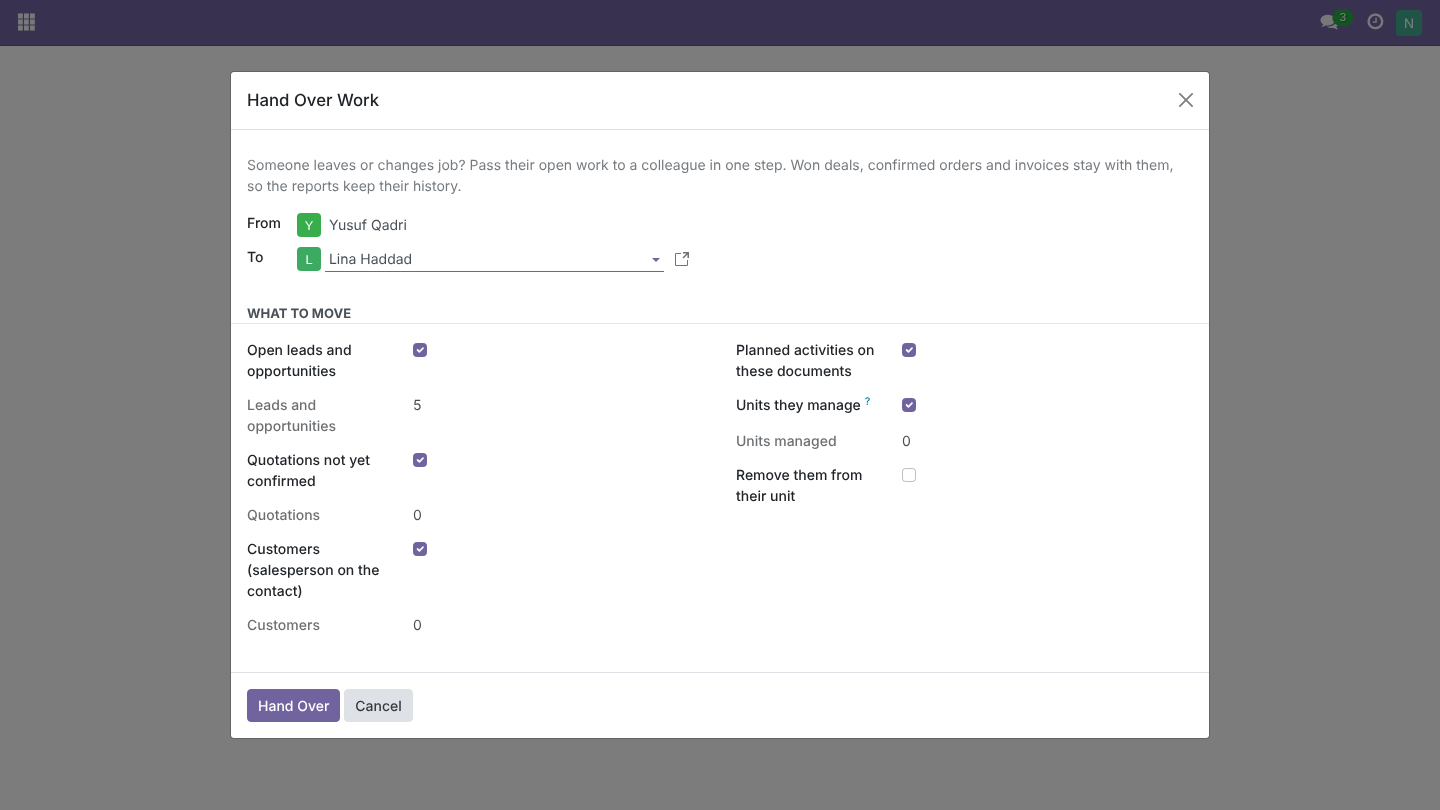
- Choose From and To. The counts show what would move.
- Tick what to move: Open leads and opportunities, Quotations not yet confirmed, Customers (the salesperson on the contact), Planned activities on those documents, and Units they manage (the new person becomes the manager).
- Tick Remove them from their unit if they leave the structure.
- Click Hand Over.
Won deals, confirmed orders and invoices stay with the original seller, so their results remain in the reports. A manager can hand over the work of people in their own structure; sales administrators can hand over anyone's.
Was this page helpful?