Odoo Amazon Connector
Run your Amazon business from Odoo. Orders you ship yourself (FBM) and orders Amazon ships (FBA) come into Odoo with the buyer, address, VAT, shipping and promotions. Odoo sends the shipment confirmation with the tracking number when you deliver, keeps your FBM stock and prices up to date on every marketplace, reads your FBA stock and returns, turns Amazon refunds into credit notes and books each settlement with its fees, matched with the order payments.
Odoo 17.0 - 20.0 Community & Enterprise $399 one-time ($350 + $49 engine)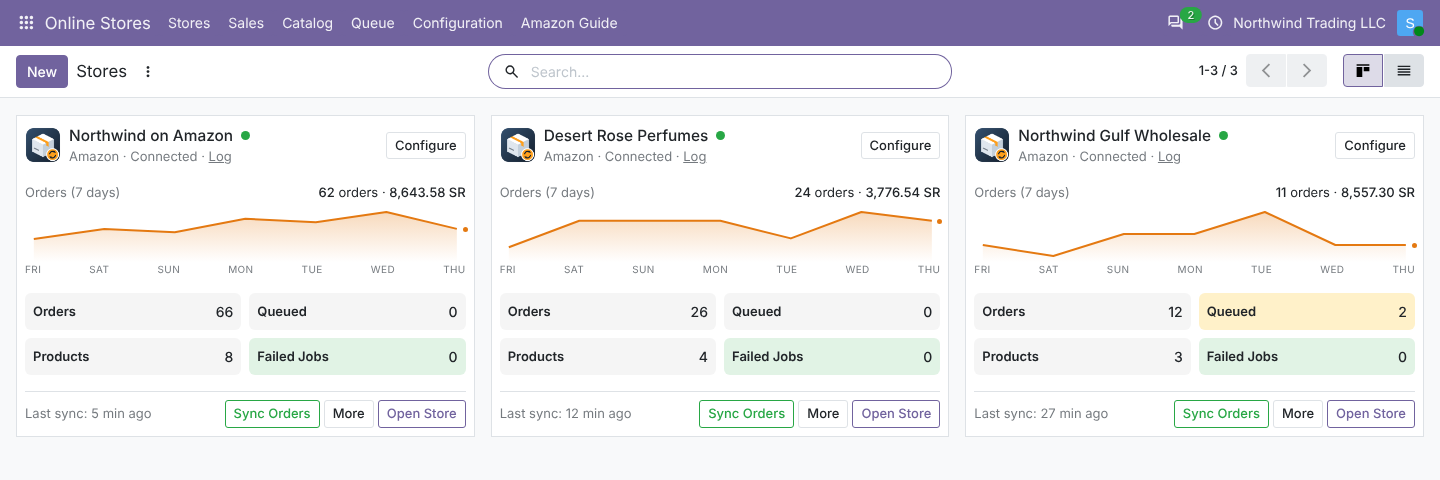
Odoo Amazon Connector on the Apps Store
See it in two minutes
Watch the demo on YouTube: FBM and FBA orders arrive as sales orders, tracking goes back to Amazon, FBA stock is read into Odoo, offers go out with stock safeguards, and settlements are booked with every fee.
Set it up step by step
Watch the setup on YouTube: three minutes from connection to the first shipped order, covering marketplaces, matching by barcode, stock from two warehouses, orders shipped from a showroom resupplied from the main warehouse, and importing your listings.
Supported features
| Area | What you get |
|---|---|
| Connection | Amazon Selling Partner API with your own developer app (client ID, client secret, refresh token): free, your Odoo talks to Amazon directly. Link with Amazon (one click, no keys) is coming soon. Every marketplace of your seller account in one store; several seller accounts per company. |
| Orders | FBM and FBA orders every 15 minutes, with later status changes. Buyer, delivery address, product lines, shipping, gift wrap, promotions and VAT. Totals are compared with Amazon. Pending orders wait until Amazon confirms the payment. |
| VAT | Each Amazon tax rate per marketplace (for example 15% on Amazon.sa, 5% on Amazon.ae) is mapped to an Odoo tax, also price-included taxes. Marketplace facilitator taxes (collected by Amazon) can be left out. |
| Order workflow | FBM: confirmed, delivered from your warehouse, invoiced and paid once shipped. FBA: delivered from the FBA warehouse and invoiced at once. Each step is set per payment method. |
| Shipment (FBM) | Validating a delivery sends the shipment confirmation to Amazon with carrier and tracking number, also for partial deliveries. Feed results are checked. |
| Cancellations | Both ways: cancelled on Amazon cancels in Odoo, cancelled in Odoo cancels on Amazon (before shipment). |
| Listings | Import your listings, link them to Odoo products by SKU or barcode, or create the missing products. Several SKUs per product, one offer per marketplace. |
| Stock and prices | FBM stock from the Odoo warehouses you choose (free, on hand or forecasted, with a buffer). Prices per marketplace from a pricelist. |
| FBA | FBA warehouse in Odoo with available, reserved, unsellable and inbound quantities, read every 6 hours. Customer returns daily, damaged units to an Unsellable location. |
| Refunds | Amazon refunds become credit notes with the refunded products. |
| Settlements | Each settlement (usually every two weeks) becomes one journal entry: deposit, sales, fees and reimbursements per account, order payments reconciled. |
| Switching | Take over the orders and SKUs of Odoo Enterprise's own Amazon connector, so nothing is imported twice. |
| Privacy | Buyer names and addresses removed after the number of days you choose. |
| Operations | Job queue with automatic retries, a readable log, a dashboard per store, protection of test copies of the database, two access levels. |
What is sent where
| From | To | What |
|---|---|---|
| Amazon | Odoo | Orders and their changes, cancellations, listings and offers, FBA stock, FBA returns, refunds, settlements |
| Odoo | Amazon | Shipment confirmations with tracking, cancellations, FBM stock, prices |
Data only travels between your Odoo and Amazon. Nothing goes through Novator.
How it works
- Scheduled checks: every 15 minutes Odoo asks Amazon for orders created or changed since the last check. FBA stock and refunds every 6 hours, returns and settlements once a day.
- Feeds: shipments, cancellations, stock and prices go to Amazon as feeds. Odoo checks the result of each feed and shows what Amazon accepted.
- Job queue: every import and every update to Amazon is a job in Online Stores > Queue > Jobs. A job that fails is tried again after 2, 4, 8 and 16 minutes, then waits for you with the reason.
- Workflows: after an order is imported, the settings of its payment method (Amazon FBM or Amazon FBA) decide what Odoo does next.
Included in version 1.0
| Included | Not included yet |
|---|---|
| Own developer app, every SP-API marketplace, several accounts per company | Link with Amazon (one click): coming soon |
| FBM and FBA orders with VAT, shipping, gift wrap and promotions | Amazon Business quantity pricing, Multi-Channel Fulfillment orders |
| Shipment confirmation with tracking, cancellations both ways | Buying shipping labels through Amazon (use an Odoo shipping connector) |
| Listings import, offers per marketplace, FBM stock and prices | Creating new listings from Odoo (product types and attributes) |
| FBA stock, FBA returns, refunds as credit notes | Refunds started in Odoo (refund in Seller Central; the credit note follows) |
| Settlements with fees and reconciled order payments | Advertising costs (Amazon Ads) |
| Take over from Odoo's Amazon connector |
Next steps
- Install the app. It installs the Commerce Bridge engine with it.
- Create your developer app in Seller Central and connect the store.
- Go through the store settings and map the VAT.
- Import your listings; if you use FBA, create the FBA warehouse.
- Read how orders are imported and shipped.
- Optional: settlements, and if you used Odoo's own connector, switch from it.
Every purchase includes a free setup call: write to [email protected].