
POS Keyboard Shortcuts
Cashiers run the register from the keyboard: pick the customer, change quantities, take the payment, validate and print, each with an Alt shortcut. You choose the keys, give every payment method its own key, and the cashier sees every shortcut with Alt + /.
Odoo 16.0 - 20.0 Community & Enterprise $49, one-time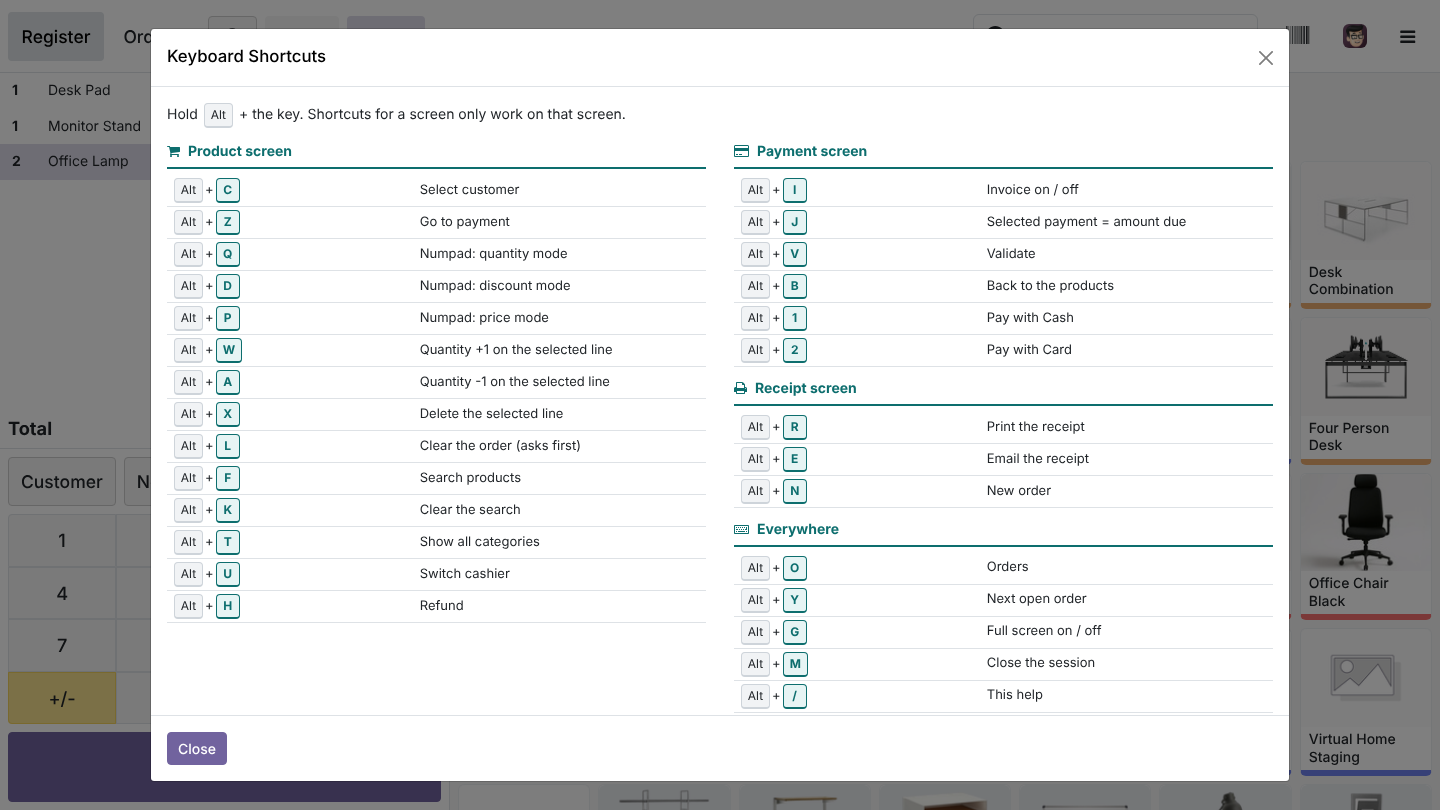
- Faster checkout: no reaching for the mouse between scanning, quantities and payment.
- Your keys: one profile per counter, a key per payment method, and the modifier you prefer (Alt, Alt + Shift or Ctrl + Alt).
- Safe: clearing an order asks first, plain letters never trigger a shortcut, and duplicate keys are refused.
Nothing changes in how orders are saved or paid: each shortcut does exactly what the button it replaces does.
POS Keyboard Shortcuts on the Apps Store
Next steps
Was this page helpful?