Taxes and VAT
Amazon VAT
Amazon sends the tax of each order line. Odoo turns it into a rate per marketplace, for example amz-SA-15 (15% on Amazon.sa) or amz-AE-5 (5% on Amazon.ae), and maps each rate to an Odoo tax once.
- Map them before the first orders. In Online Stores > Configuration > Taxes, create a line per marketplace and rate: Store Tax ID
amz-<country>-<rate>(for exampleamz-SA-15), Odoo Tax your VAT tax. Orders then use your own tax, with its accounts and tax grids. - Price-included taxes work. In Saudi Arabia and the UAE prices usually include VAT. If the mapped Odoo tax is included in price, Odoo puts the price with VAT on the line, so the Odoo total equals the Amazon total to the cent.
- Amazon rounds the tax of every line to the cent. Odoo recognises the real rate (4.57 on 30.43 is 15%, not 15.02%), so one mapping covers every order.
- Marketplace facilitator tax: where Amazon collects and pays the tax itself (most US states, and some other countries), choose Amazon Taxes: No taxes on the store's Orders tab. Orders then come in without tax.
Odoo can take the taxes from Amazon or from the Odoo products. Choose with Taxes on the store's Orders tab.
| Taxes | Lines get | Use it when |
|---|---|---|
| Use the taxes charged by the store (default) | The Odoo tax mapped to each tax Amazon charged on that line. A line without store tax gets no tax. No fiscal position mapping. | Amazon calculates your taxes (the usual case). Odoo then matches the store total. |
| Use the store taxes, then apply the fiscal position | The mapped store taxes, then replaced as the order's fiscal position says (the store's Fiscal Position, or the one Odoo picks from the customer address) | Amazon charges the tax, but your accounting needs other taxes for some customers (for example export, intra-community or exempt). |
| Use the Odoo product taxes | The taxes of the Odoo product, adjusted by the fiscal position | Odoo is the reference for taxes and the store only shows prices. The Odoo total can then differ from the store total. |
Tax mapping
With store taxes, each tax Amazon uses gets a line in Online Stores > Configuration > Taxes the first time it appears in an order.
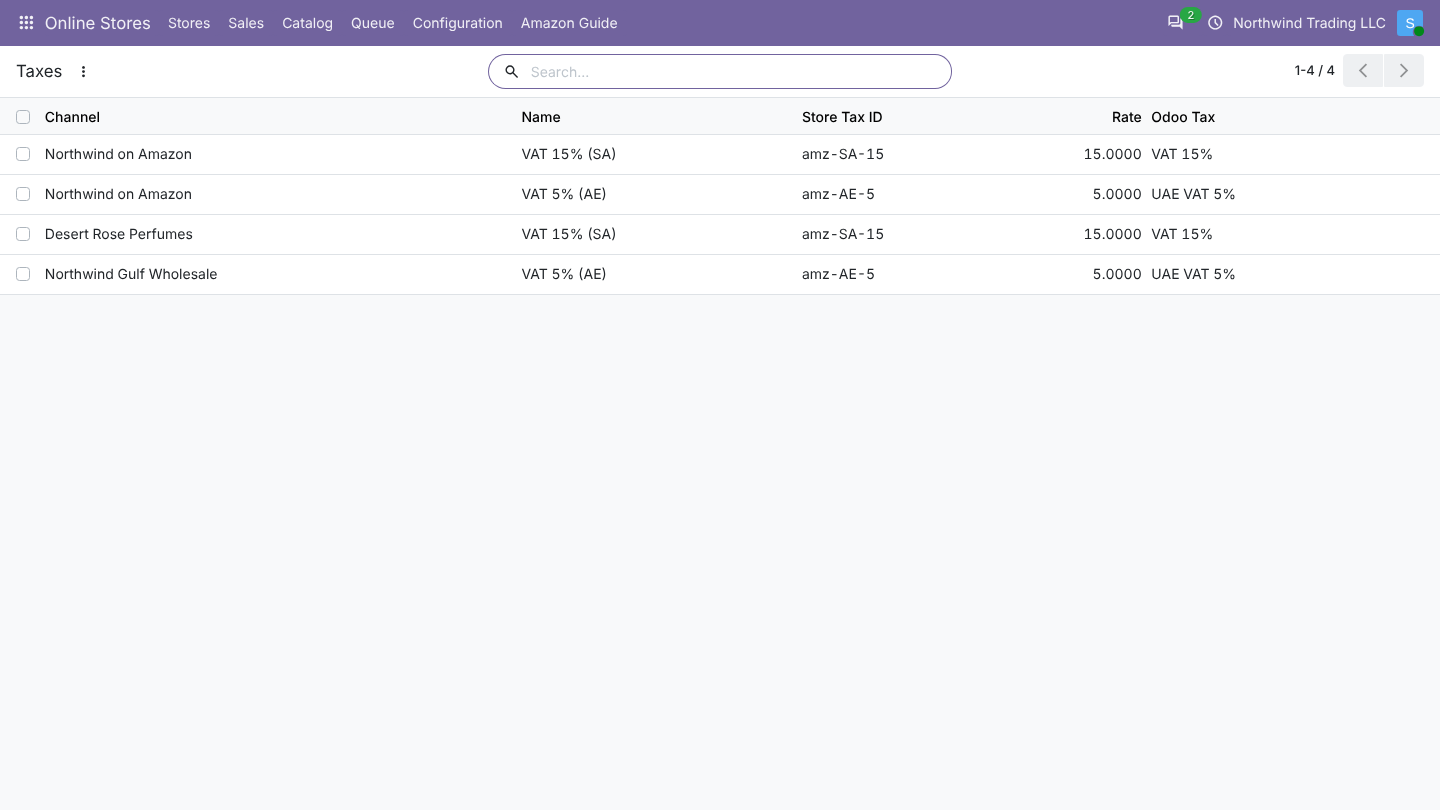
| Column | Meaning |
|---|---|
| Store | The store |
| Name | The tax name in Amazon |
| Store Tax ID | How Odoo recognises the tax |
| Rate | The rate in percent |
| Odoo Tax | The Odoo sales tax used on order lines. You can change it. |
When a new store tax appears, Odoo fills Odoo Tax with the first sales tax of the store's company that is a percentage, has the same rate and is not included in the price. If there is none:
- with Create Missing Taxes on, Odoo creates one, named after the store tax and its rate (for example HST 13%), tax excluded, with the store's Tax Account and Tax Account on Credit Notes when set, and notes it in the log;
- with it off, the order waits in the queue with Store tax "X" (r%) has no Odoo tax. Map it in Configuration > Taxes. Map it, then click Retry on the job.
Check every created tax once, before the first invoices are posted. Without a Tax Account on the store, Odoo creates it without a tax account, and always without tax grids, so its amount could be booked on the income account and be missing from tax reports. Set the account on the store before the first import, check the grids on the tax, or map the store tax to an existing Odoo tax instead.
Totals that differ
After each import Odoo compares its order total with the Amazon total. When they differ by more than one cent:
- the order shows a yellow banner The total of this order differs from the store total,
- the log gets a warning,
- the store card on Stores shows total differences, and the filter Total Differs From Store on Orders lists them.
The usual causes are a store tax mapped to an Odoo tax with another rate or set as included in price, a fiscal position replacing taxes, or Tax Mode set to Odoo taxes. Fix the mapping, then click Update From Store on the order while it is not invoiced yet.
FAQ
Can one store tax use two Odoo taxes? No, one Odoo tax per store tax. Store orders with two taxes on a line (for example federal and provincial) get both mapped taxes.
I changed a mapping. Are old orders updated? No. The mapping is used for orders imported or updated afterwards, as long as they are not delivered or invoiced.
What about prices shown with tax included in the store? The connector converts the store amounts to amounts without tax before creating the lines, so Odoo taxes stay tax excluded.