Read the results
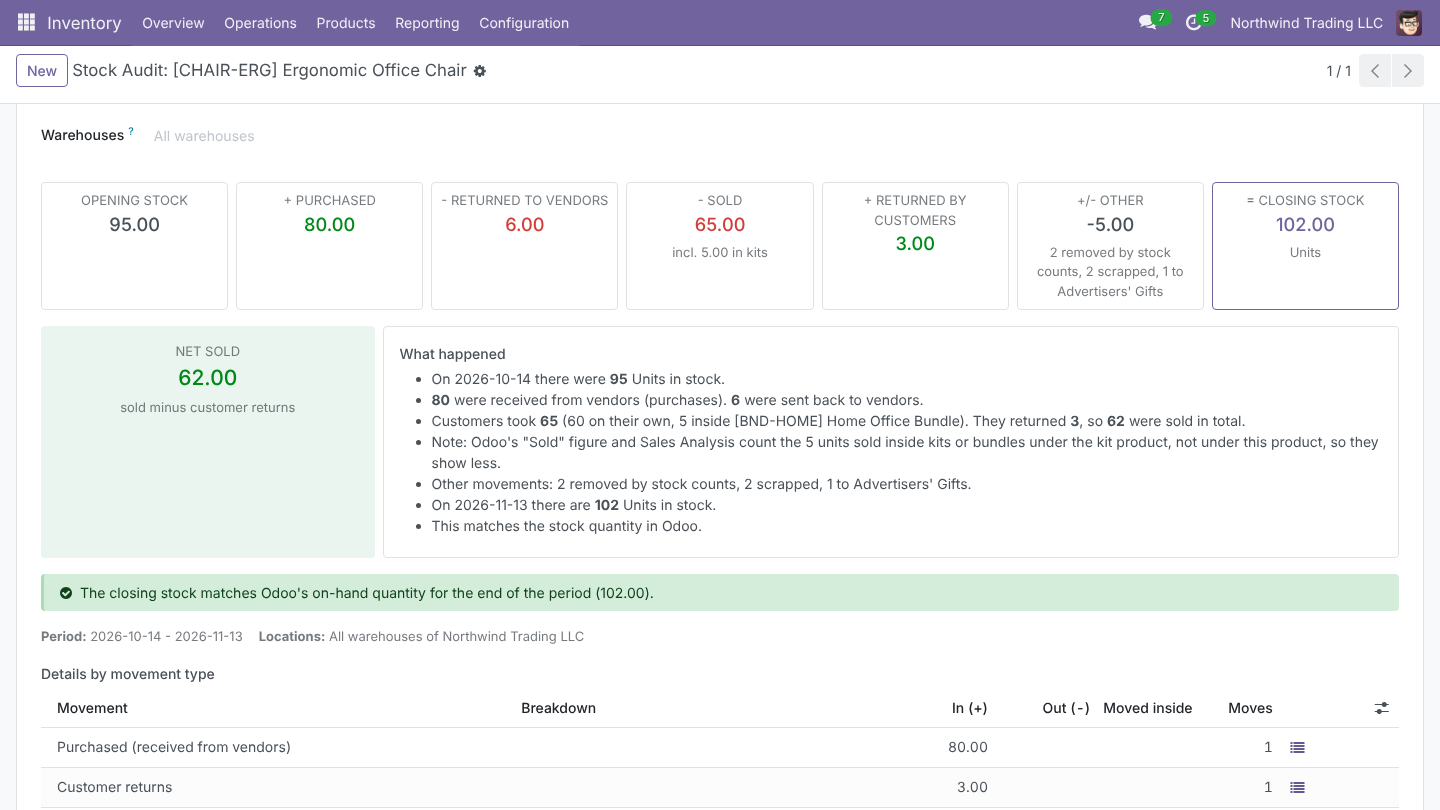
The cards
The cards read from left to right as one sum:
Opening stock + Purchased - Returned to vendors - Sold + Returned by customers +/- Other = Closing stock
| Card | Meaning |
|---|---|
| Opening stock | What was in the audited locations at the start of the first day. |
| Purchased | Received from vendors. |
| Returned to vendors | Sent back to vendors. Shown only when there is any. |
| Sold | Delivered to customers: sales orders, eCommerce, marketplace orders and Point of Sale, including units that left inside a kit or bundle ("incl. ... in kits"). |
| Returned by customers | Received back from customers, including POS refunds. |
| Other | Everything else, added up: transfers in and out, stock counts, scrap, gifts and samples, manufacturing. The line under the number says what it is made of. Shown only when there is any. |
| Closing stock | What is in the audited locations at the end of the last day. |
Net sold is Sold minus Returned by customers: what your customers kept.
What happened
The box beside Net sold tells the same story in sentences, for example:
Customers took 65 (60 on their own, 5 inside Home Office Bundle). They returned 3, so 62 were sold in total.
The last sentence says whether the closing stock matches the stock quantity in Odoo.
Details by movement type
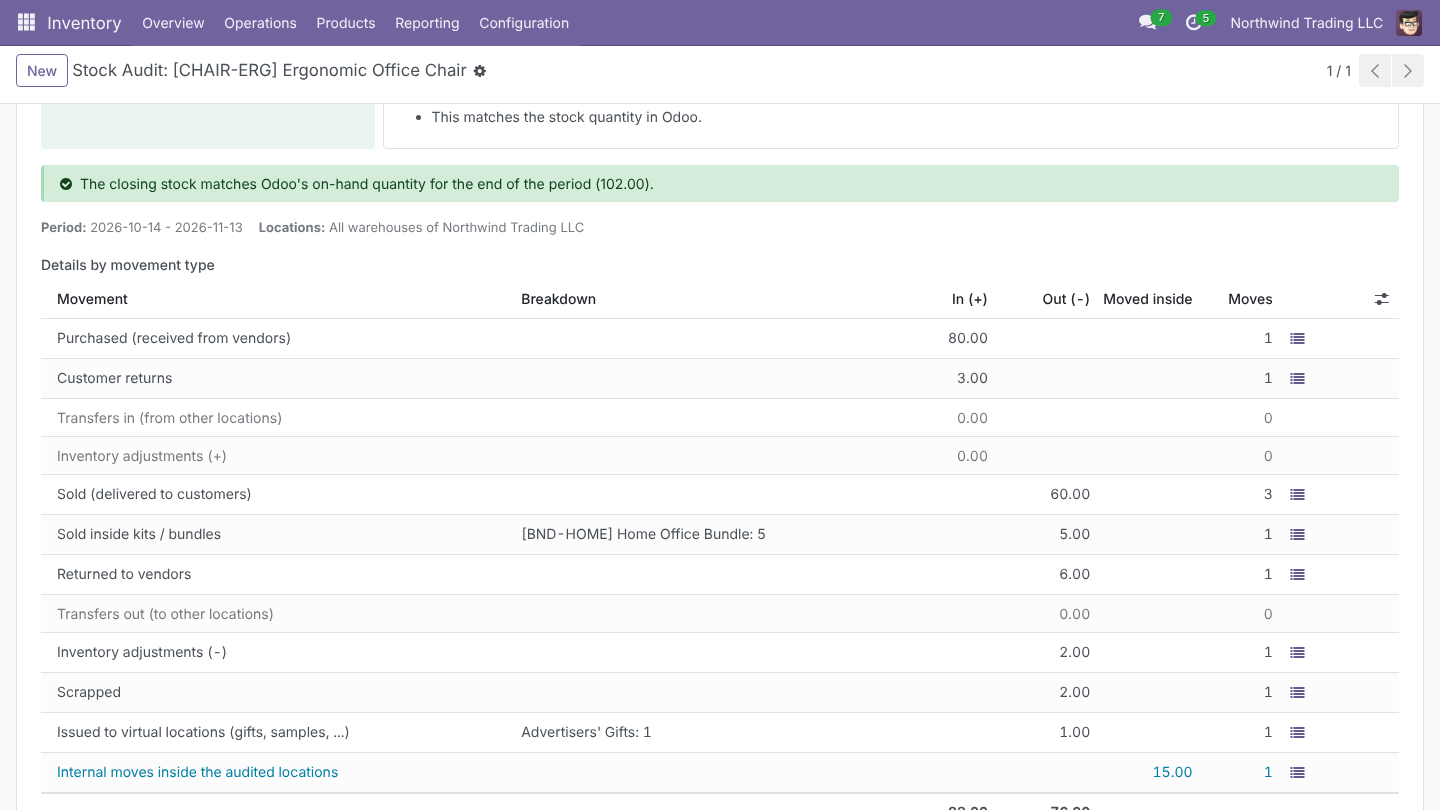
| Movement | Counted when the product... |
|---|---|
| Purchased (received from vendors) | comes from a vendor location. |
| Customer returns | comes back from a customer location. |
| Transfers in / out | comes from or goes to a location outside the audit, such as another warehouse or a transit location. |
| Inventory adjustments (+ / -) | is counted up or down in a stock count (Physical Inventory or Update Quantity). |
| Sold (delivered to customers) | goes to a customer location on its own. |
| Sold inside kits / bundles | goes to a customer location as a component of a kit (a bill of materials of type Kit). The Breakdown column names the kit. Needs Manufacturing installed. |
| Returned to vendors | goes back to a vendor location. |
| Scrapped | is scrapped. |
| Issued to virtual locations (gifts, samples, ...) | is sent by a transfer to a virtual location of type Inventory Loss, such as a gifts or samples location. The Breakdown column names the location. |
| Received from virtual locations | comes back from such a location by a transfer. |
| Manufactured / Consumed in manufacturing | comes from or goes to a production location. |
| Internal moves inside the audited locations | moves between two audited locations. Shown for information; it does not change the total. |
Lines with nothing in the period are greyed out.
Kits and bundles
When you sell a kit, Odoo delivers its components, but the sale belongs to the kit. That is why a product's Sold button and the Sales Analysis report (Sales → Reporting) can show fewer units than actually left the warehouse: units sold inside a kit are counted under the kit product. The audit counts what physically left, on its own and inside kits, and shows both. A note in What happened explains the difference whenever kits are involved.
Gifts and samples
Many companies give stock away through a transfer to their own virtual location, for example "Advertisers' Gifts". Such locations have the type Inventory Loss, the same type Odoo uses for stock counts. The audit separates them: a transfer to such a location is shown under Issued to virtual locations with the location's name, and only real stock counts are shown as Inventory adjustments.
The check against Odoo
The green bar confirms that the closing stock equals the quantity Odoo has on hand for the end of the period: today's stock in the audited locations minus everything that moved after the period. A yellow bar shows the difference. It usually means stock moved with another company, or a location that holds this product is outside the audit.