Set up Courier Management
Work through Courier → Configuration in this order. The Courier & Logistics Suite dashboard shows a setup checklist until each step is done.
Who can do what
| Group | What it allows |
|---|---|
| Courier / Rider | Opens the rider app and sees the shipments on their own sheets. |
| Courier / Counter / Booking | Books shipments, pickups and cash handovers; sees shipments of their own locations. |
| Courier / Hub Operator | Everything a counter user does, plus the hub screens. |
| Courier / Manager | Everything, plus Configuration, money and pay. |
Give the groups in Settings → Users & Companies → Users, section Courier. On the user, Courier Locations limits what a non-manager sees to the shipments that start, are now, or end at those locations. Leave it empty to see the whole network.
Network
Courier → Configuration → Network → Locations
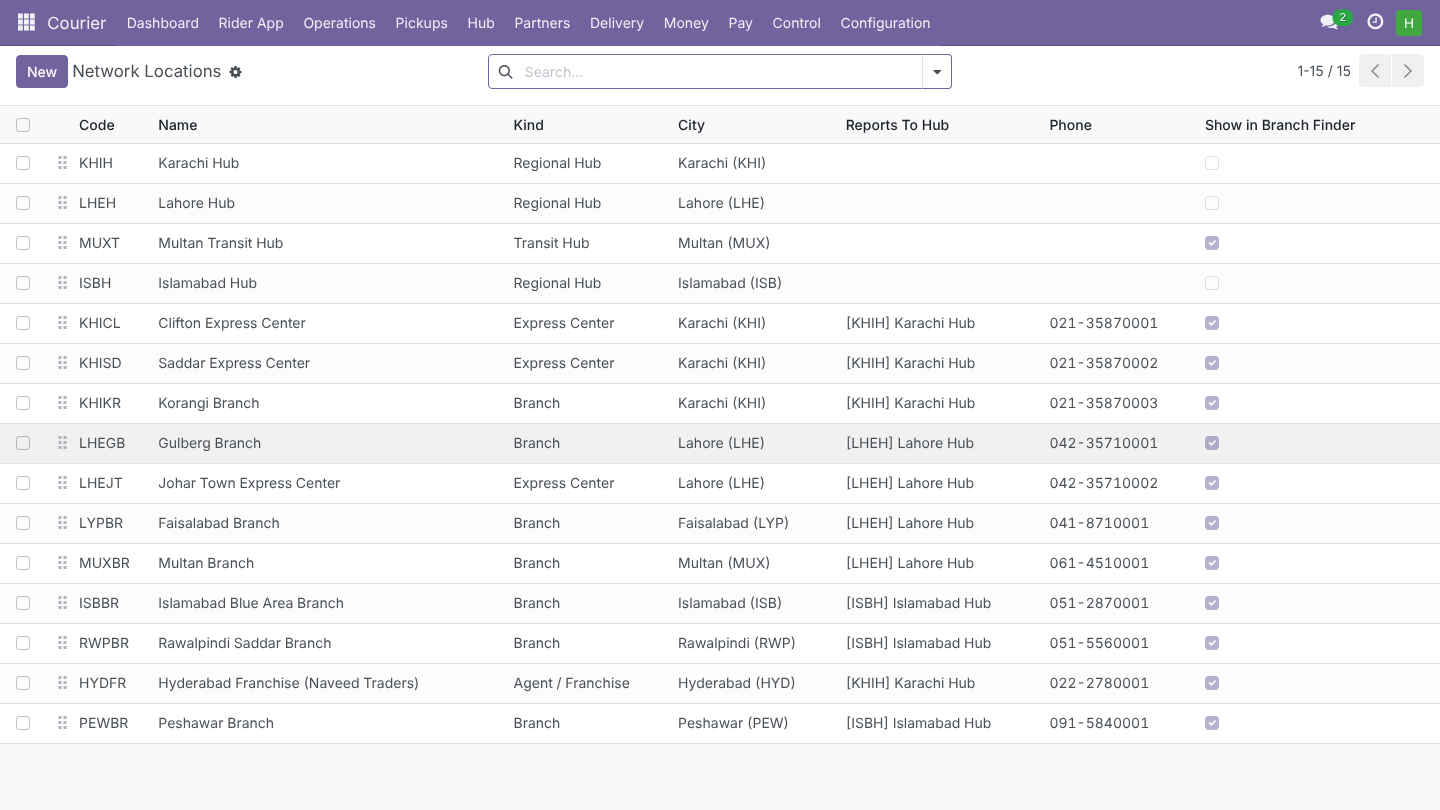
| Field | What it does |
|---|---|
| Code | Short code on labels, bags and manifests, for example KHICL. |
| Type | Express Center, Branch, Regional Hub, Transit Hub, Agent / Franchise or Partner Handover Point. |
| City | Where the location is. |
| Reports To Hub | The hub this location sends to and receives from. A shipment travels branch, hub, hub, branch. |
| Opening Hours, Phone, Latitude / Longitude | Shown in the branch finder. |
| Show in Branch Finder, Accepts Bookings | Public listing and counter booking. |
| Agent / Franchisee | The owner of an agent counter, paid by commission in Courier Pay. |
| Staff | Users who work here. |
Cities (Network → Cities): name, code, region and the Delivering Branch. A city without a delivering branch is not served; Partner Carriers can cover it. Regions group cities for the Same Region zone.
Routes (Network → Routes): pickup and delivery routes per branch with Areas (words found in addresses, such as Clifton, Block 5, DHA), a default courier and vehicle and the round trip distance used for fuel pay.
Services
Configuration → Pricing → Services
| Field | What it does |
|---|---|
| Scope | Same City, Domestic or International. |
| Transit hours, Booking Cut-off, Working Sundays | The promise: booking time (after the cut-off, the next day) plus the transit hours. |
| Volumetric Divisor, Weight Step | Chargeable weight is the higher of actual and length x width x height / divisor, rounded up to the step. |
| Invoice Product, CN Sequence | Product on invoices; own CN numbering per service. |
| COD Allowed, Offered Online | Cash on delivery for this service; show it in the rate calculator and online booking. |
Zones and lanes
Zones come from the cities: Within City, Same Region, Domestic, and International zones that list their countries. Lanes (Pricing → Lanes) override the zone for a pair: origin city or region to destination city, region or country. The most specific lane wins.
Rate cards
Configuration → Pricing → Rate Cards
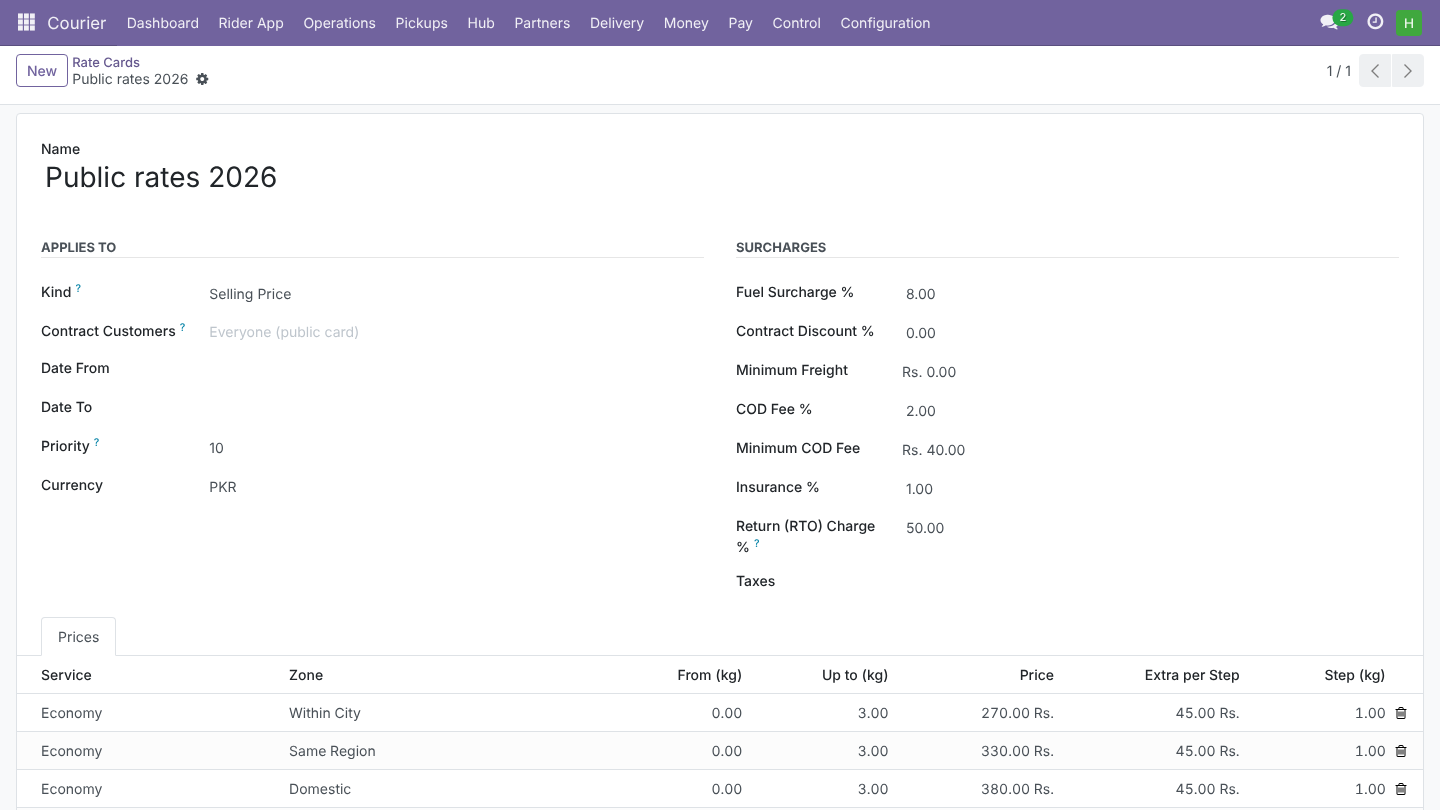
| Field | What it does |
|---|---|
| Contract Customers | Empty for the public card. Customers listed here get this card instead. |
| Valid from / to, Priority | The highest priority valid card wins. |
| Fuel Surcharge %, Contract Discount %, Minimum Freight | Applied to the freight. |
| COD Fee %, Minimum COD Fee, Insurance % | COD fee on the COD amount; insurance on the declared value when Insured is ticked. |
| Return (RTO) Charge % | Share of the freight billed when a shipment returns. |
| Taxes | Sales taxes on the charges. |
| Prices | Per service and zone: From (kg) (exclusive), Up to (kg), Price, and for the last slab Extra per Step and Step (kg). |
Couriers and vehicles
Configuration → People and Vehicles. A courier has a Type (Courier, Driver, Rider), Employment (employee or contractor, used by Courier Pay), a Login for the rider app, a Payee contact and a home branch. Vehicles have a plate, type, capacity and the last odometer reading.
Settings
Courier → Configuration → Settings
| Setting | What it does |
|---|---|
| Counter cash journal | Where cash and card paid at the counter are recorded. |
| Late scan grace | A scan recorded later than this after it happened is flagged as recorded late. |
| Pin distance | A delivery pin farther than this from the delivering branch weakens the address grade. |
| Public Rate Calculator, Online Booking on the Website | Turn the public pages on or off. |
Customers
On a contact, tab Courier: Courier Account Type (walk-in, credit account, COD seller), Courier City (where pickups and API bookings start) and Courier Credit Limit (booking stops when unbilled charges and unpaid invoices would pass it).