Targets
Periods and exchange rates
CRM → Targets & Forecast → Periods (sales administrators). Create a month, quarter or year: To is filled from From and the kind.
Count foreign currency at decides how orders and invoices in another currency count:
| Choice | Use it when |
|---|---|
| Budget rate (default) | You want achievement to move only with sales, not with exchange rates. The Budget Rates tab is filled from Odoo's rates on the first day; change them if finance gives you budget rates. Add Missing Currencies adds new ones. |
| Rate on the document date | Each order or invoice counts at Odoo's rate on its date. |
| Average rate of the period | One average rate for the whole period. |
Each unit has a Currency (its company's by default), and targets are set in it.
Set a target
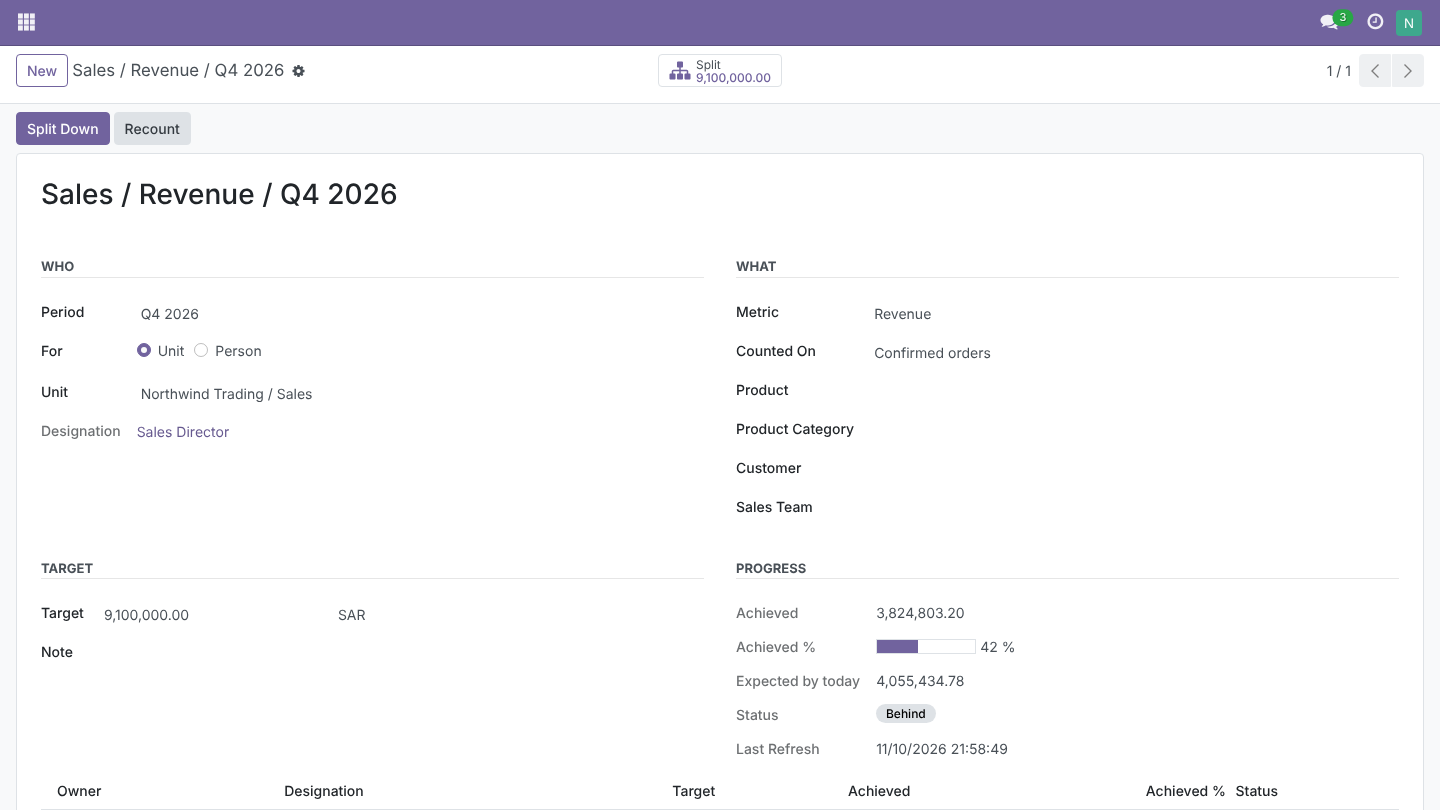
CRM → Targets & Forecast → Targets → New:
| Field | Choices |
|---|---|
| For | A Unit or a Person. |
| Metric | Revenue, Quantity, Number of orders or New customers (first confirmed order ever). |
| Counted On | Confirmed orders, Invoices (credit notes subtract) or Paid invoices. |
| Product, Product Category, Customer, Sales Team | Optional: count only these. A category includes its sub-categories. |
| Target | The amount, in the currency shown next to it. |
A unit target counts the documents of the unit and every unit below it, by the unit they were sold in. A person target counts that person's documents.
Split down
On a unit target click Split Down:
- Evenly, In proportion to last year (same dates one year earlier), or I will type the amounts.
- Include the manager gives the manager a share too.
It creates or updates one target for each unit and member right below. Run Split Down on those to go further down. The Split button shows the total of the targets below.
Achievement and pace
Achieved is counted every hour and when you click Recount (on a target, or in the Command Center). Achieved % compares it with the target; Expected by today is where it should be at this point of the period, and Status says Reached, Ahead, On pace, Behind or At risk.
CRM → Reporting → Target Analysis opens the targets in pivot and graph, grouped by designation, period, unit, metric or category.
Who can set targets
Everyone sees their own targets, their unit's, and those of the units and people below them. Managers set targets only below them; sales administrators set all targets.
Revenue splits on opportunities count on each person's revenue and quantity targets when the target counts confirmed orders: see Opportunity team.