Dashboard
Online Stores > Stores shows a card per store. Open Store opens the Jazi seller portal.
Online Stores > Stores shows one card per store. Several stores of the same platform sit side by side, each with its own figures.
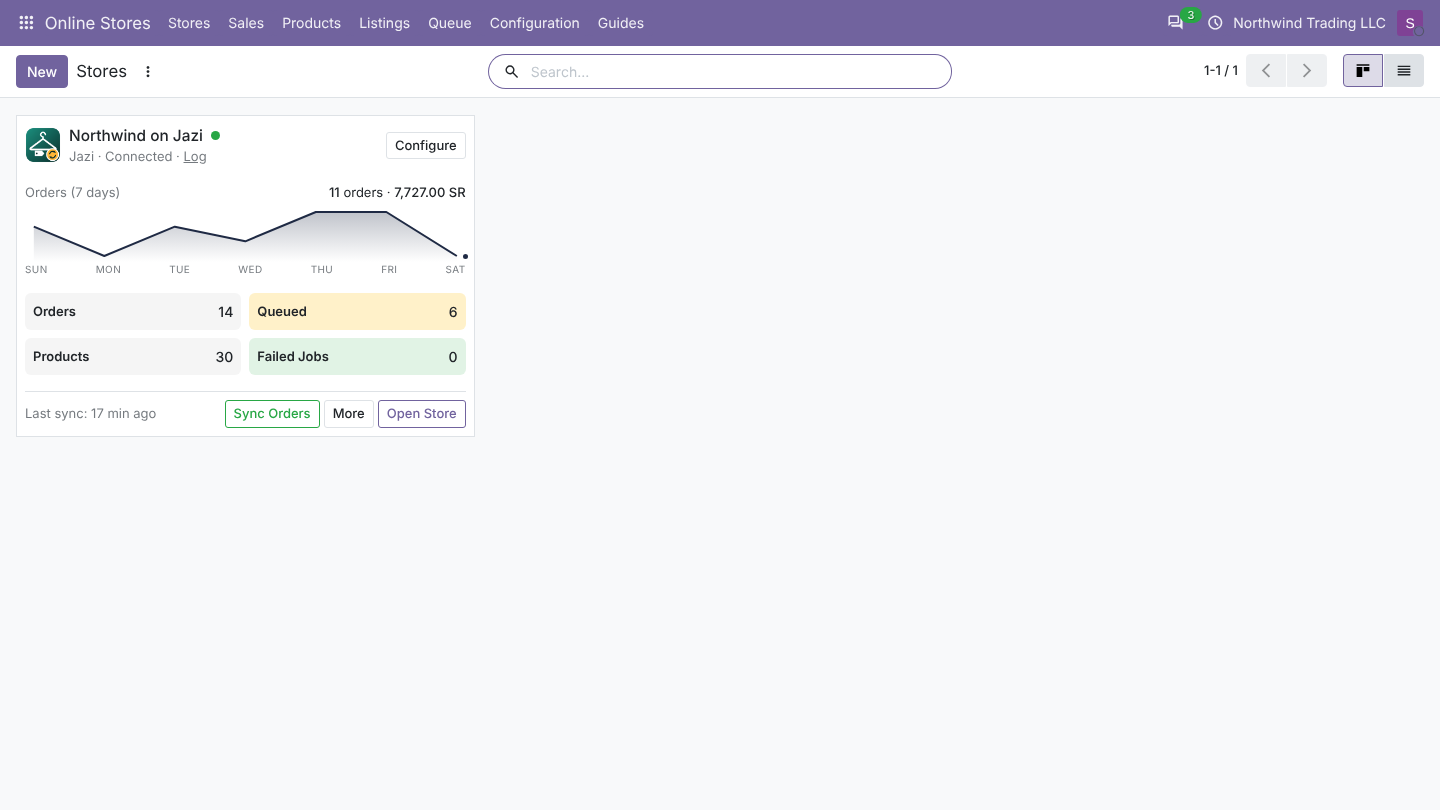
| On the card | Meaning |
|---|---|
| Status dot and text | Green Connected, red Connection error, grey Not connected. Read only copy when the store was connected from another database. |
| Configure | Opens the store settings |
| Log | The log of this store |
| Orders (7 days) | Orders with an order date in the last 7 days (cancelled ones excluded) and their total without tax, in the company currency |
| Chart | Orders per day over the last 7 days |
| Orders | All orders of the store |
| Queued | Jobs waiting or running (amber when there are some) |
| Products | Products and variants linked to the store |
| Failed Jobs | Jobs that gave up (red when there are some, green at 0) |
| orders with total differences | Orders whose Odoo total differs from the store total (shown only when there are some) |
| Last sync | When orders were last checked |
| Sync Orders | Check for new and changed orders now |
| More | All bulk operations (the Sync window) |
| Open Store | Opens the store's own admin in a new tab |
| Set up connection / Fix connection | Shown instead of the sync buttons while the store is not connected or has a connection error |
The tiles open the matching list: click Orders, Products, Queued or Failed Jobs. Sales are converted to the company currency, so the cards of stores in different currencies can be compared.
The store form has the same counters as buttons at the top: Orders, Products, Customers, Pending Jobs, Failed Jobs and Log. Online Stores > Sales > Sales Analysis shows sales per store and month.
One store account can only be connected once per company (the same shop, site or seller account twice would import every order twice). Odoo refuses the second one with a message naming the store that already has it.