Link products
Odoo is the master of your catalogue: it never creates Odoo products from Jazi. Products you already sell on Jazi are linked to the Odoo products with the same code.
- Set Match Products By on the store's Products tab: Internal Reference = SKU, Barcode = SKU, or one then the other.
- Click Sync..., choose Import products from the store and Run in Background.
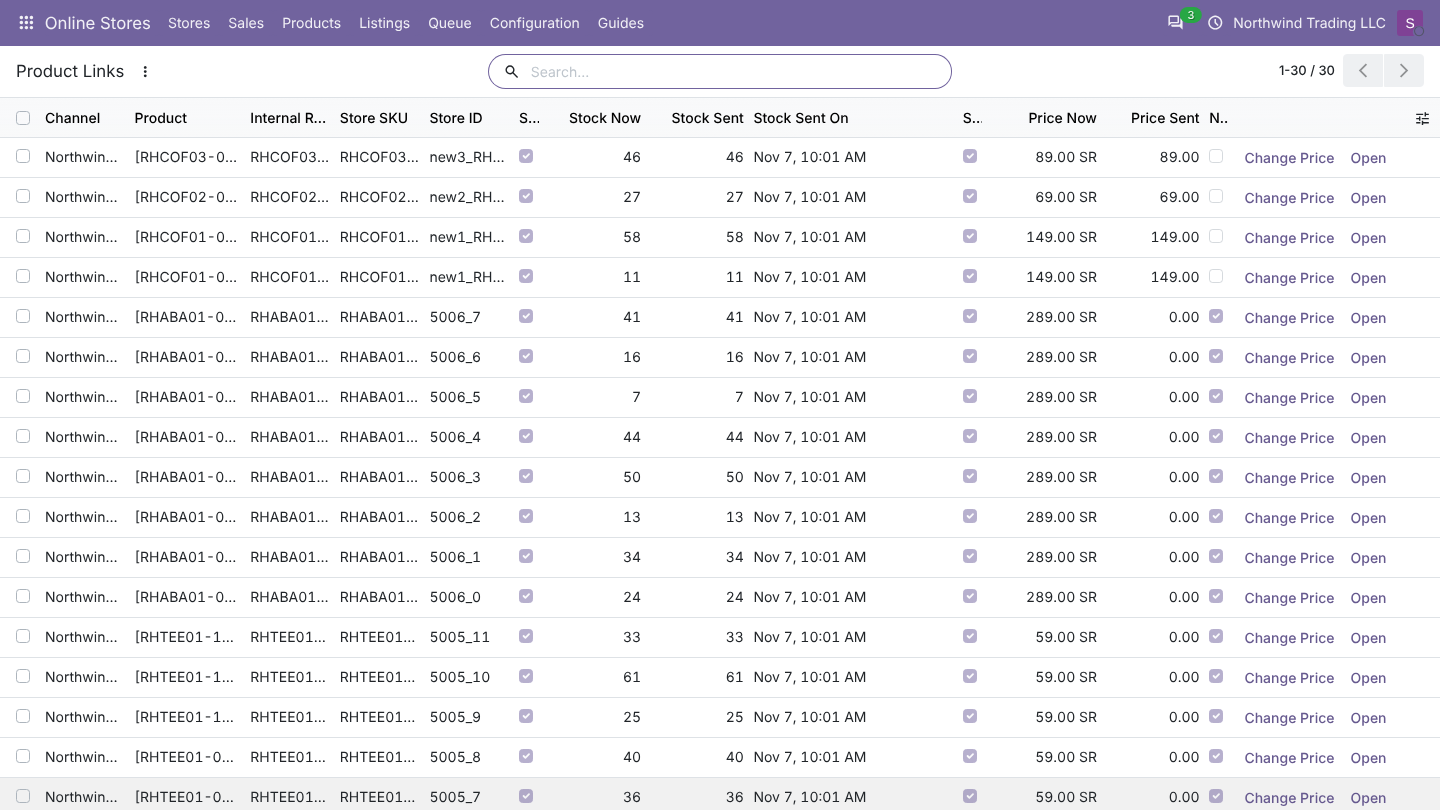
- Open Online Stores > Listings > Product Links to see each Jazi variant and its Odoo product.
| What happens | Result |
|---|---|
| A Jazi variant's seller SKU matches an Odoo product | Linked: stock and prices of that product are sent to this variant from now on. |
| No Odoo product matches | Not linked, and listed in Queue > Log with the Jazi system SKU. Give the Odoo product that code, then import again. |
| The Jazi product has no saved content in Odoo yet | Open it in Listings > Jazi > Jazi Products and click Read from Jazi to bring its names, category and details into Odoo. |
Running the import again is safe: each variant keeps one link.
Columns of Product Links
| Column | Meaning |
|---|---|
| Store ID | Jazi system SKU of the variant. |
| Store SKU | Your seller SKU on Jazi. |
| Stock Now / Stock Sent | Quantity Odoo would send now, and the last one sent. They differ until the next send. |
| Price Now / Price Sent | The same for prices. |
| Change Price | Sets a new price in the store pricelist, and sends it at once if you tick it. |
Was this page helpful?