List on Jazi
List on Jazi creates new Jazi products from Odoo products. It checks everything Jazi needs before anything is sent.
Open it
- From a Jazi category: List Products (the category and its details are already loaded).
- From products: select Odoo products (or variants), then Action > List on Jazi.
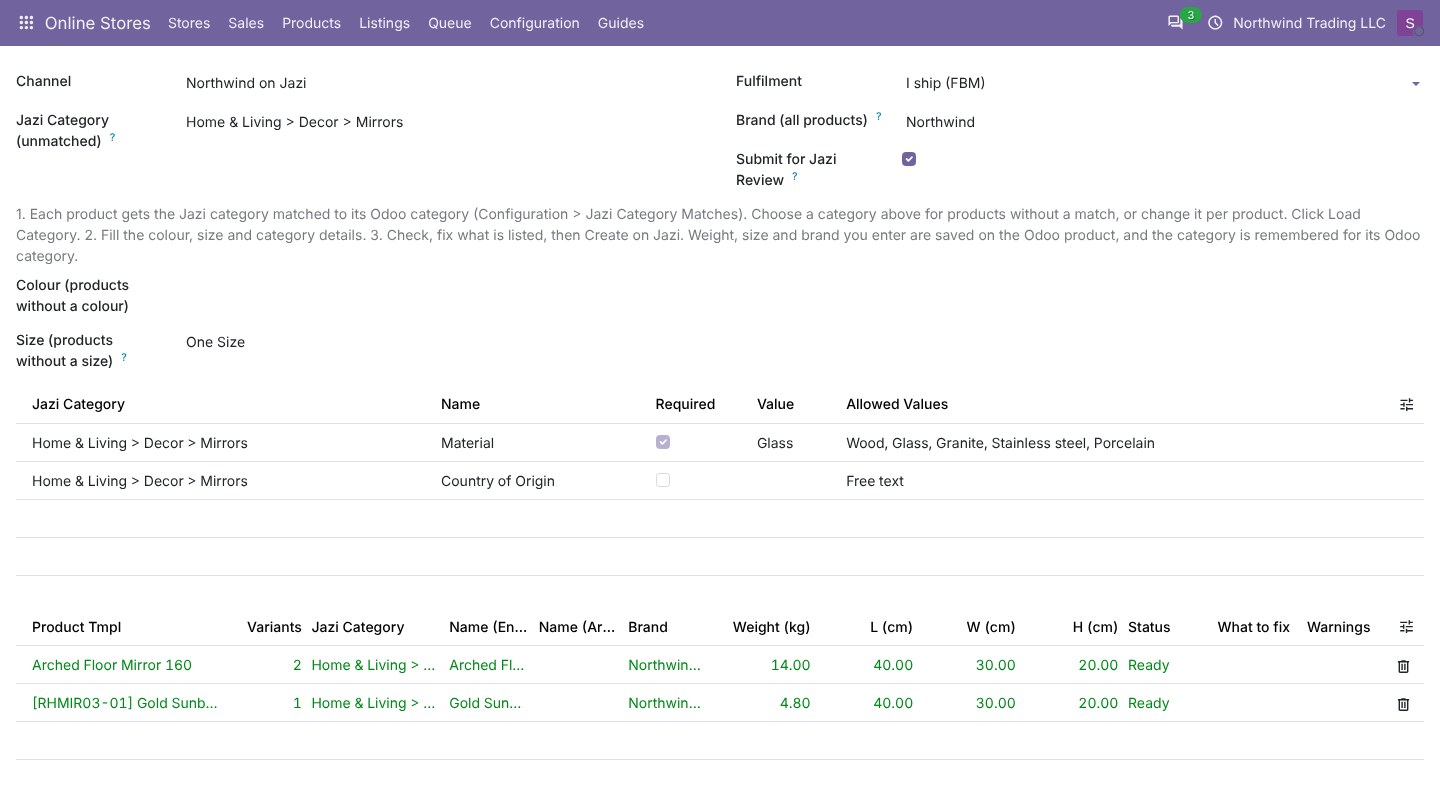
Fill it
- Jazi Category: for products whose Odoo category has no match. Each line can have its own. Click Load Category after changing it: Odoo reads its sizes and details from Jazi.
- Category details: the table lists the details of each category; Required ones need a Value (pick one of the Allowed Values when Jazi gives a list).
- Colour and Size for products without variants of that kind, for example One Size.
- Brand (all products), Fulfilment (I ship (FBM)) and Submit for Jazi Review.
- On each line: names in English and Arabic, descriptions (filled from the Sales Description), brand, weight and size.
- Click Check. Each line shows Ready, or What to fix and Warnings.
- Click Create on Jazi.
What is checked
| Check | Why |
|---|---|
| Category and its required details | Jazi refuses a product without them. |
| Every colour and size has a Jazi match | Unmatched values are added to Colour and Size Matches for you to match. |
| Brand | From the line, the screen, the product's Brand, or the store's Default Brand. A brand typed on the line is saved on the product. See Brands. |
| Weight | Jazi needs it for shipping. Weight entered here is saved on the Odoo product. |
| Photos of at least 500 x 500 px | Jazi fetches them from Odoo's public image address. JPEG, PNG and WebP are read. The variant photo, the product photo and the extra product photos all count. |
| SKU or barcode | Every variant needs the code chosen in Match Products By. |
| Size (length, width, height) | A warning only: without it Jazi uses 1 x 1 x 1 cm. |
After Create on Jazi
- Each product is created with all its variants, linked to Odoo, and its price and stock are recorded as sent.
- What was sent is saved as a Jazi product in Odoo.
- With Submit for Jazi Review, the products go to Jazi's review. Odoo checks the review status a few times over the next hours, and the Jazi product shows Live when Jazi approves it.
- A test copy of the database never creates products on Jazi.
Was this page helpful?