Alerts and log level
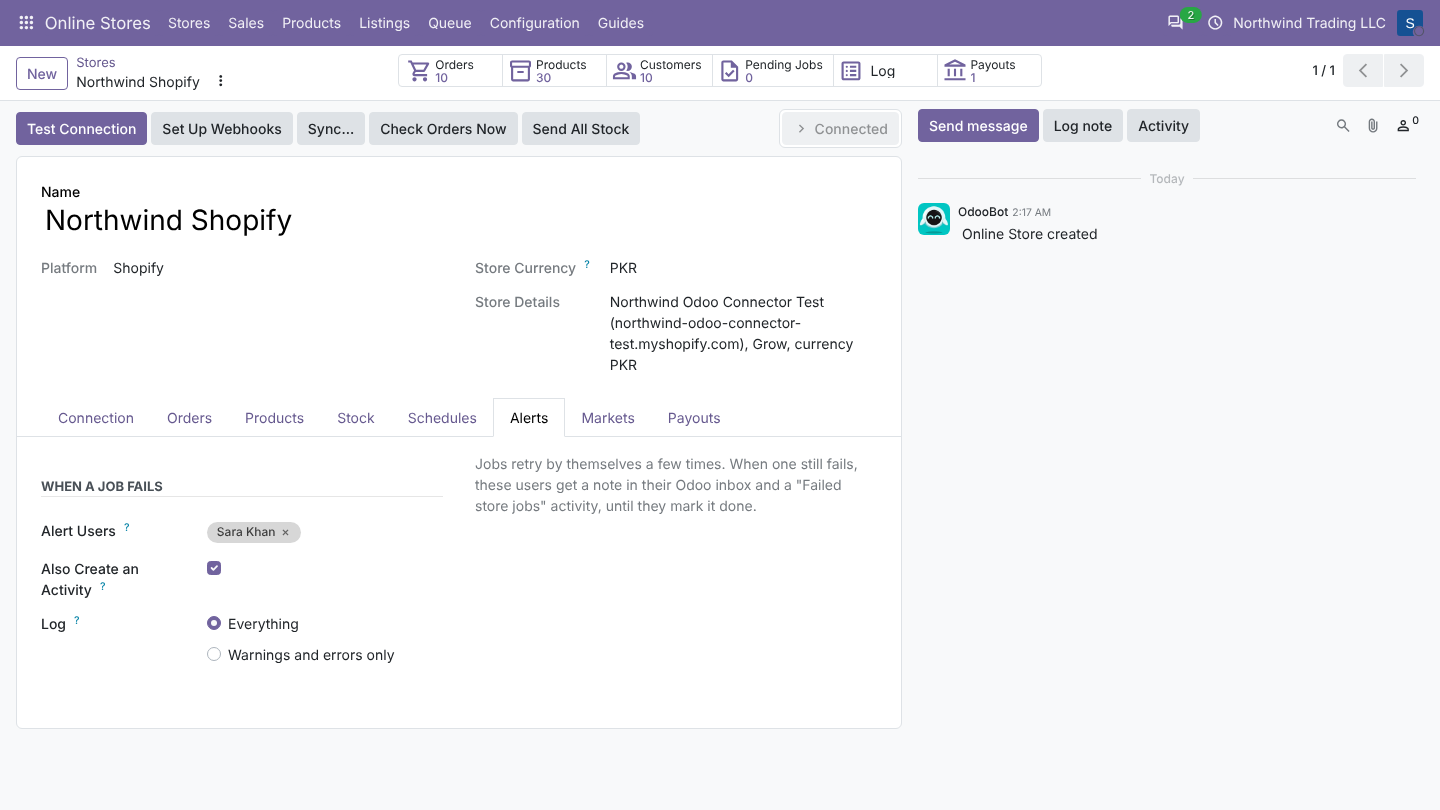
A job that fails is tried again by itself (after 2, 4, 8 and 16 minutes). When it still fails, it stops in Online Stores > Queue > Jobs with the reason. Alerts make sure someone hears about it without opening the queue.
Open Online Stores > Stores, click the store, then the Alerts tab (administrators only).
| Field | Default | What it does |
|---|---|---|
| Alert Users | Empty | Users told when a job of this store fails for good. Each gets a note in their Odoo inbox (Discuss) with the job and the first line of the error. Empty: no alerts. |
| Also Create an Activity | On | Shown when users are set. Each user also gets a to-do activity Failed store jobs on the store. While it is open, later failures add to the inbox note but no second activity, so a bad night does not create fifty to-dos. Mark it done once the jobs are fixed. |
| Log | Everything | Everything: every operation is written to Queue > Log. Warnings and errors only: successful syncs are not logged, which keeps the log short on busy stores. Jobs keep their own result either way. |
What to do with an alert
- Open the store's Failed Jobs (dashboard tile, or Queue > Jobs filtered on Failed).
- Read the error. Most are fixed in a setting: a missing product link, a tax to map, an expired token.
- Fix it, then Retry the job. Mark the Failed store jobs activity done.
Was this page helpful?