Schedules
Webhooks bring changes from Shopify at once. Scheduled syncs are the safety net, and the way stock and prices go out on a regular rhythm.
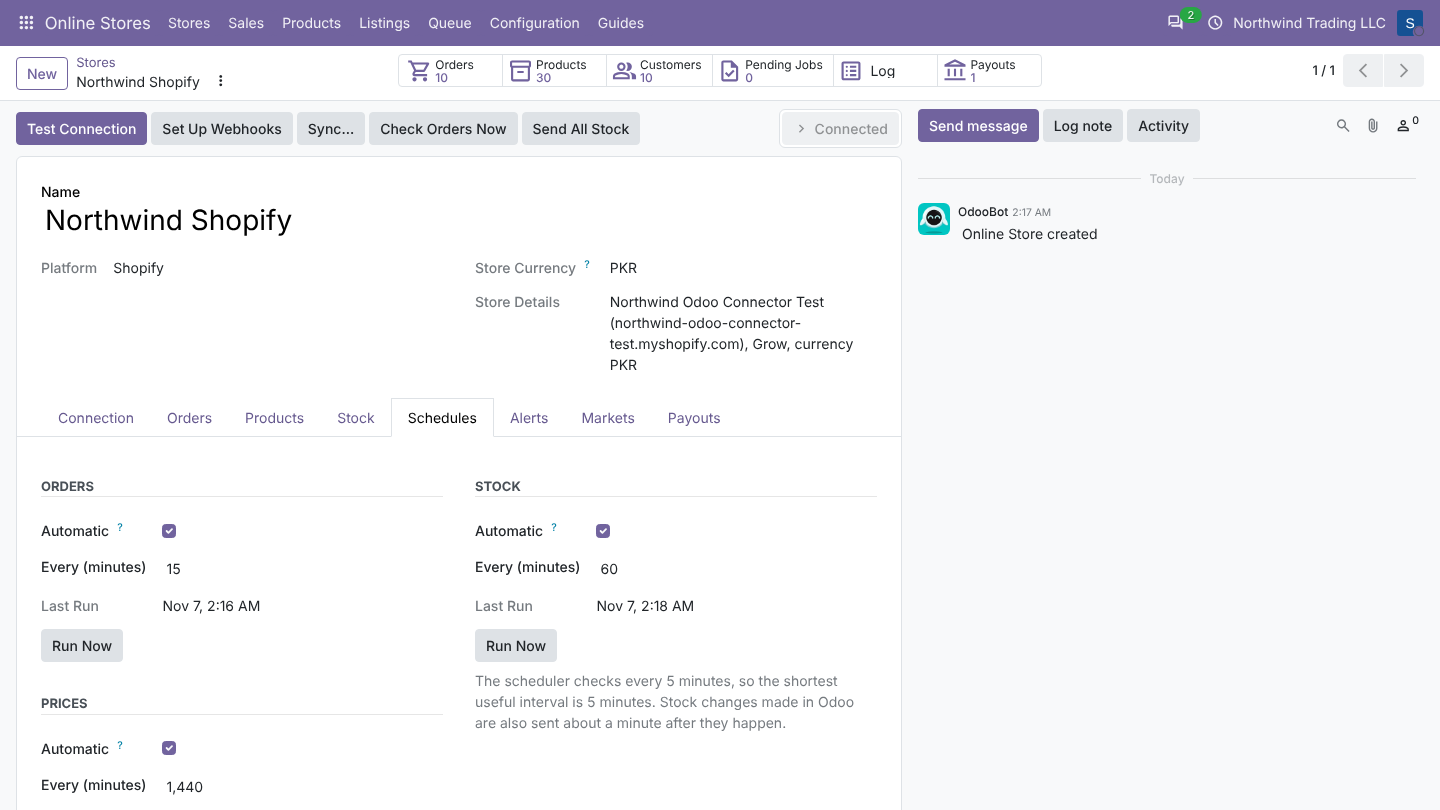
Each store has its own schedule. Open Online Stores > Stores, click the store, then the Schedules tab (administrators only).
| Group | Field | Default | What it does |
|---|---|---|---|
| Orders | Automatic | On | The same switch as Import Orders Automatically on the Orders tab. Odoo asks Shopify for orders created or changed since the last check. This is the safety net next to webhooks. |
| Every (minutes) | 15 | How often the order check runs. | |
| Last Run | Read only. When the order check last ran (the next one starts from here). | ||
| Stock | Automatic | On | The same switch as Send Stock Automatically on the Stock tab. |
| Every (minutes) | 60 | How often Odoo checks every linked product and sends the quantities that changed. Stock moves in Odoo are still sent about a minute after they happen, whatever this interval. | |
| Last Run | Read only. When stock was last checked or sent. | ||
| Prices | Automatic | Off | The same switch as Send Prices Automatically on the Products tab. |
| Every (minutes) | 60 | How often Odoo sends the prices that changed since they were last sent. A store that reviews price changes (marketplaces) may prefer once a day: 1440. | |
| Last Run | Read only. When prices were last checked or sent. |
Each group has a Run Now button: it queues the same job at once (check orders, send all stock, send all prices). Follow it in Online Stores > Queue > Jobs.
How the schedule runs
- One scheduled action, Online Stores: scheduled syncs (per store schedules), wakes up every 5 minutes and starts the syncs that are due for each store. So 5 minutes is the shortest useful interval; a smaller number behaves like 5.
- A sync is never queued twice: when the previous one is still waiting or running, nothing new is added.
- In a copy of the database (staging, test), scheduled syncs do not run until you click Use in This Database on the store. On Odoo.sh staging, scheduled actions are off: use Run Now, or Run Pending Jobs in the queue.
Choosing the intervals
Keep orders at 15 minutes or less when webhooks are not set up, because the schedule is then the only way orders arrive. With webhooks working, 30 or 60 minutes is enough. Stock every hour is a good default: moves in Odoo are sent at once anyway.
Was this page helpful?