Sales channels
In Shopify a product is visible on a sales channel (Online Store, Point of Sale, Shop, Facebook...) only when it is published there. Odoo can publish the products it sends on the channels you choose.
Set up
- Open Online Stores > Stores, click the store and click Test Connection (or Read Locations and Markets Again on the Stock tab). Odoo reads the store's sales channels.
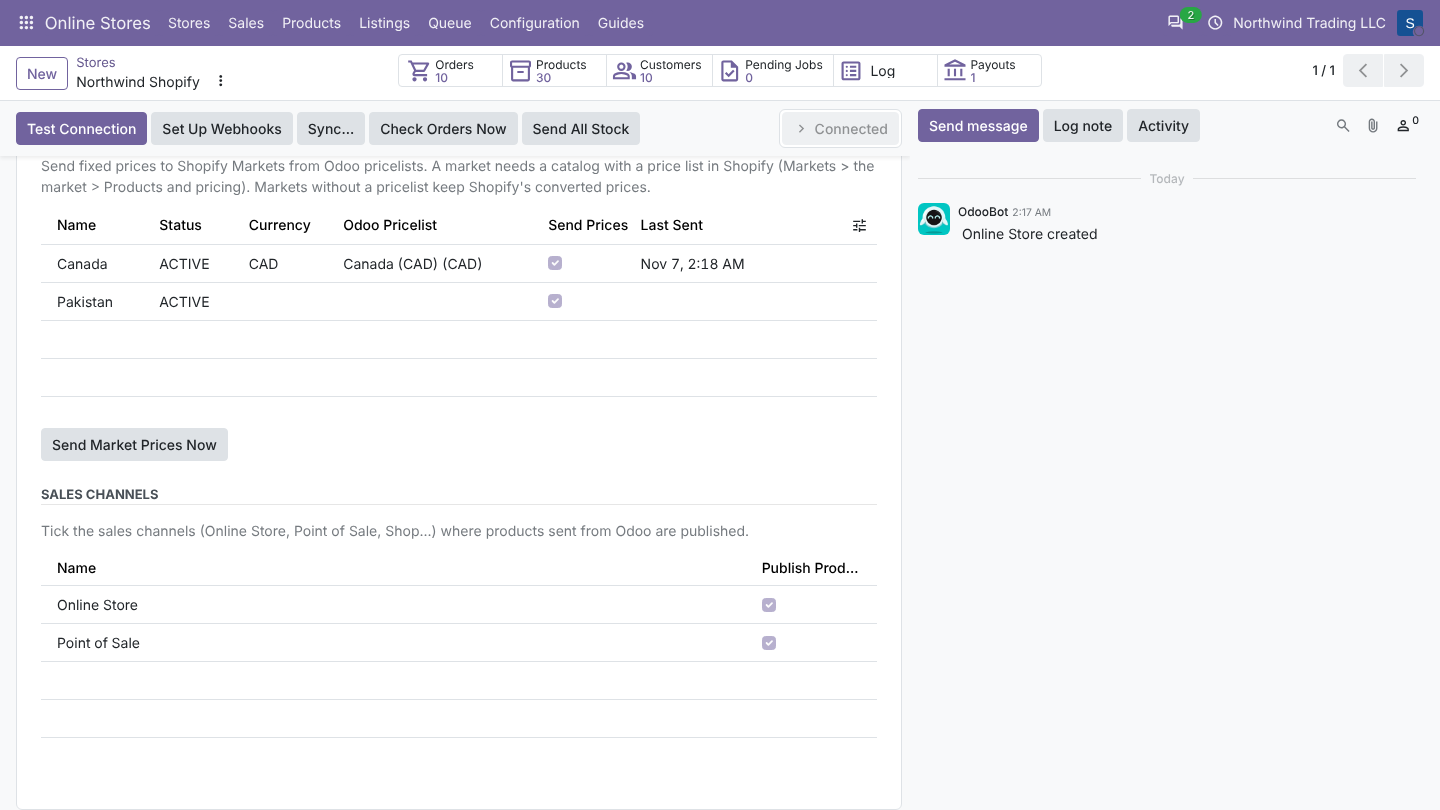
- Open the Markets tab. Under Sales Channels, every channel of the store is listed.
- Tick Publish Products Here on the channels you want, for example Online Store and Point of Sale.
The app needs the scopes read_publications and write_publications (already in the scope list of Create the Shopify app).
What happens
- Every time Odoo sends a product (Send to Store, Update in Store, automatic sending), it publishes it on the ticked channels. Products already published stay published.
- Channels that are not ticked are not touched: Odoo never unpublishes from a channel.
- A product is only visible on a channel when its status is Active. A Draft product is published but stays hidden until you make it active (Publish on the store product).
- If Shopify refuses (for example a missing scope), the product is still sent and a warning not published on the sales channels is written to the log.
FAQ
The product is in Shopify but not on the POS app. Tick Point of Sale under Sales Channels, then Update in Store. Check that the product is Active.
A new channel is missing in the list. Click Test Connection again: Odoo reads the channels each time.
Was this page helpful?